
What is Reappraising?
Reappraisal Stones are one of the most valuable resources in Summoners War. Using a reappraisal stone on a Legend or Ancient Legend rune completely rerolls all four substats while keeping the main stat, set, slot, and innate (prefix) stat intact. This means a mediocre Violent Slot 4 CD% rune with poor substats can potentially become a god-tier rune with perfect speed, CR%, ATK%, and HP% rolls — all without changing what makes the rune fundamentally useful.
Because reappraisal stones are extremely limited (you can only craft 3 per week from the crafting building), choosing the right rune to reapp is critical. Wasting a reapp stone on a rune that won't meaningfully improve your account is one of the most common mistakes players make. The SWLens Reapp Target Calculator solves this by analyzing your entire rune box, identifying gaps in your collection, and ranking every eligible rune by how much your account would benefit from reappraising it.
Two Ways to Access

Home Dashboard (Automatic)
After importing your SWEX JSON, the Rune Overview bar on the home dashboard automatically shows your RE-APP TARGS count. Click it to see a prioritized list of reapp candidates — no setup or configuration needed.

Standalone Calculator (Detailed)
Found under the Other Tools section in the webapp. Provides a full Rune Box Gap Analysis table, detailed priority breakdowns per rune, advanced filters (set, slot, RL threshold), and expandable rune details. Access it at Other Tools → Reapp Calculator.

Home Dashboard Integration
Once your SWEX JSON file is imported and connected to your account, the home dashboard automatically calculates your reapp targets — no extra steps needed. The Rune Overview bar at the top of the dashboard shows key metrics for your entire rune inventory:
- TOTAL — total runes in your account
- EQUIPPED — runes currently on monsters
- INVENTORY — runes in your backpack
- RE-APP TARGS — runes identified as reapp candidates
- POWER-UP — runes that need leveling
- KEEP — runes above the keep threshold
- SELL — runes below the sell threshold
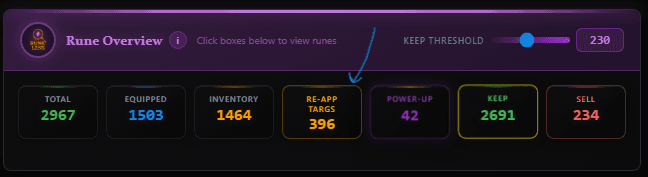
Click the RE-APP TARGS box to open a popup showing all your reapp candidates ranked by priority. Each rune displays its priority score, current location (which monster has it equipped, or backpack), set, slot, main stat, innate stat, and substats. The Keep Threshold slider at the top adjusts the RuneLens score cutoff — runes above this score are considered “keep” quality and won't appear as reapp targets.
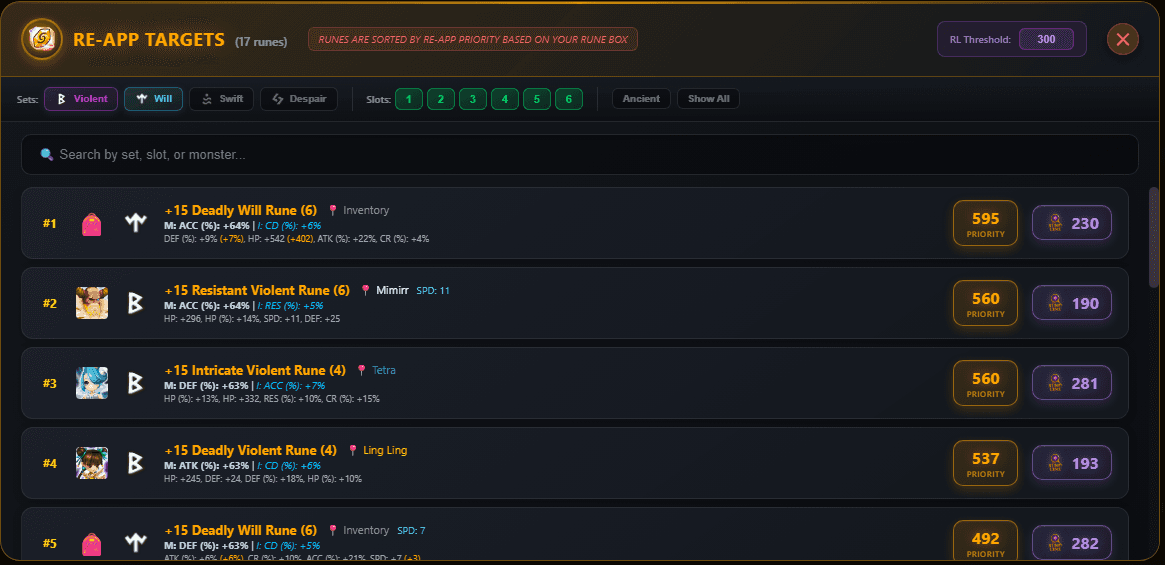

Standalone Calculator
The standalone Reapp Target Calculator is found under the Other Tools section in the webapp. It provides a much more detailed analysis than the dashboard version, including a full Rune Box Gap Analysis table that shows exactly where your rune collection is weakest — and why certain runes are prioritized over others.
Advanced Filters
The standalone calculator offers granular control over which runes are shown:
- Set Toggles: Enable/disable Violent, Will, Swift, and Despair independently
- Slot Filters: Show only specific rune slots (1-6)
- RL Threshold: Adjust the RuneLens score cutoff (default 300) — runes above this are hidden as they're already efficient
- Show All: Toggle to show/hide duplicates, 18+ speed runes, and flat innate runes
- Ancient Rune Exclusion: Excludes Ancient grade runes by default
Expandable Rune Details
Click any rune in the list to expand its full priority breakdown — showing exactly how the innate score, slot score, and gap score were calculated. You'll also see the gap category details (your box stats vs targets) and the top 3 gap fills highlighted, so you understand why each rune is ranked where it is.
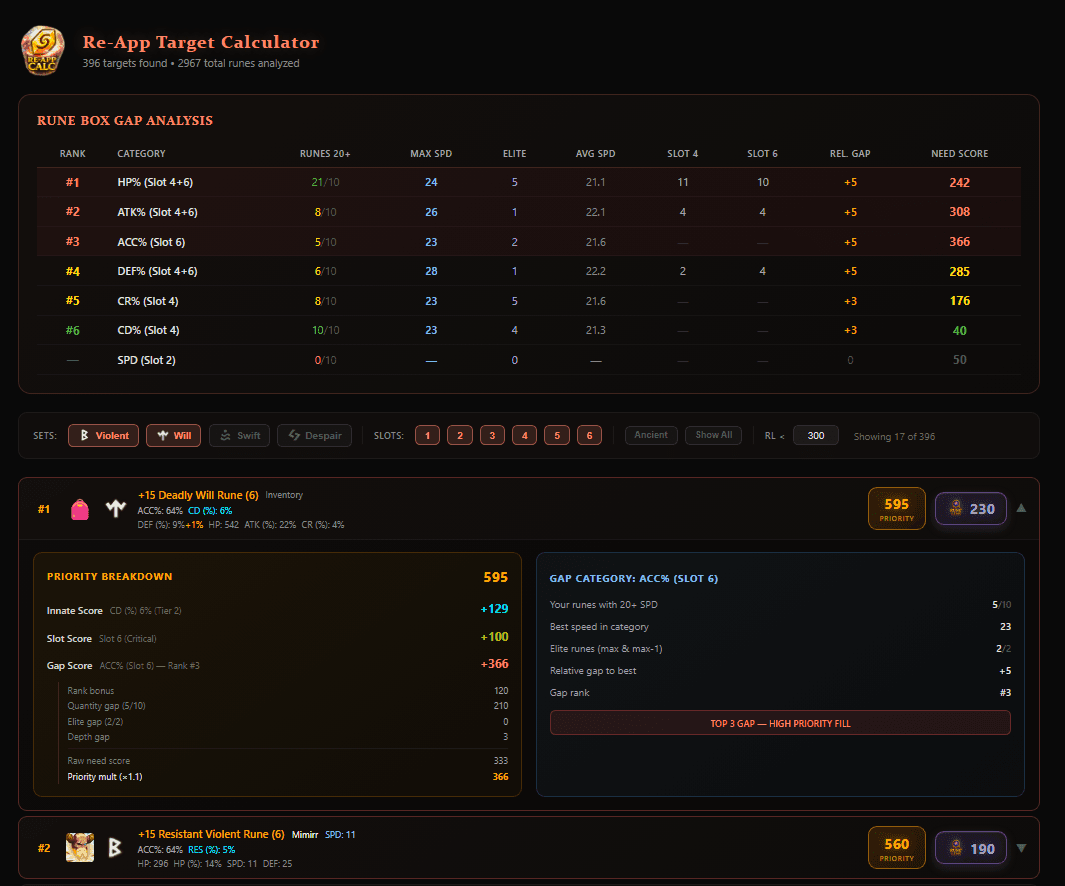
Rune Box Gap Analysis
The gap analysis table is the heart of the standalone calculator. It analyzes your entire rune collection and identifies which stat categories are weakest — telling you exactly where reappraising would have the most impact.
7 Categories Tracked
Combined HP% runes across Slot 4 and Slot 6
Combined ATK% runes across Slot 4 and Slot 6
Combined DEF% runes across Slot 4 and Slot 6
Critical Rate runes on Slot 4 only
Critical Damage runes on Slot 4 only
Accuracy runes on Slot 6 only
Speed runes on Slot 2
What Each Column Means
- Rank: Overall priority ranking — #1-5 (red) are your highest priority gaps
- Runes 20+: How many runes in this category have 20+ base speed (target: 10)
- Max SPD: The highest speed rune you have in this category
- Elite: Count of your max or near-max speed runes (target: 2)
- Avg SPD: Average speed across all runes in this category
- Slot 4 / Slot 6: How many runes exist in each slot — detects coverage gaps
- Rel. Gap: Relative speed gap compared to your best category
- Need Score: Calculated priority score for this category (higher = more urgent)
Reapp Target Eligibility
Not every rune qualifies as a reapp target. The calculator applies strict filters to ensure you only see runes where reappraising makes strategic sense:
Must Meet ALL of These
- Set: Violent, Will, Swift, or Despair only — the most impactful PvP sets
- Grade: Legend (6-star) or Ancient Legend — reapping lower grades is inefficient and a waste of stones
- Innate Stat: Must have a non-flat innate (prefix) stat
- Speed: Current speed must be under 20 (runes with 20+ speed are already valuable)
Automatically Excluded
- Flat innate stats (HP, ATK, DEF flat) — low value innates
- HP%, ATK%, DEF% innates — considered suboptimal for reapp targeting
- Invalid main stats: Slot 2 must be SPD, Slot 6 excludes RES% and flat stats
- Runes already at 18+ speed that just need a power-up (hidden by default)
Valid Main Stats by Slot
Any
SPD only
Any
HP%, ATK%, DEF%, CR%, CD%
Any
ACC%, HP%, DEF%, ATK%
Priority Scoring Formula
Each eligible rune receives a Total Priority Score that determines its ranking. The score combines three components:
Total Priority = Innate Score + Slot Score + Gap ScoreInnate Score (0-200 points)
Measures the quality of the rune's innate (prefix) stat. Higher-value innates on more desirable stats score higher:
Innate Score = (innate_value / tier_max) × tier_weight × 100- Tier 1 (weight 2.0): ACC% (max 8), CR% (max 6) — most valuable innates
- Tier 2 (weight 1.5): RES% (max 8), CD% (max 7)
- Tier 3 (weight 1.0): HP% (max 8), ATK% (max 8), DEF% (max 8)
Slot Score (50-100 points)
Rune slots with more impactful main stats receive higher priority:
- Slots 4 & 6: 100 points — highest impact (CR%, CD%, HP%, ATK%, ACC%)
- Slot 2: 75 points — SPD main stat runes
- Slots 1, 3, 5: 50 points — fixed main stats, lower priority
Gap Score (0-600+ points)
The most dynamic component — measures how much your rune box needs this specific category of rune. The gap score considers:
- Rank-Based Score: Categories ranked higher in the gap table receive more points
- Quantity Gap: How far you are from having 10 runes with 20+ speed in this category
- Elite Gap: How far you are from having 2 elite (near-max speed) runes
- Depth Gap: Difference between your best and average rune speed in this category
- Slot Coverage Gap: Bonus if you have zero runes in Slot 4 or Slot 6 for this category
Priority multipliers further adjust the gap score based on stat importance: HP% (1.3x), ATK% (1.2x), CR%/CD% (1.2x), ACC% (1.1x), DEF% (1.0x).
RuneLens (RL) Score
The RuneLens Score is SWLens's proprietary rune efficiency metric. Unlike simple efficiency calculators that treat all substats equally, the RL score measures how well each substat rolled relative to its maximum possible value, with special handling for different rune grades and stat types.
Formula
Special Rules
- Legend/Ancient Legend and Slot 2 SPD runes: RES% and ACC% substats are included in the score calculation
- All other runes: RES% and ACC% substats are excluded (but innate RES%/ACC% still counts)
- Flat stats (HP, ATK, DEF flat): Always excluded from the score
Keep & Sell Thresholds
The Keep Threshold slider on the home dashboard controls the RuneLens score cutoff for categorizing your runes. The default is 230. Runes scoring above the threshold are marked as KEEP, while runes below are marked as SELL candidates.
Approximate Quality Guidelines
Definitely keep. Well-rolled rune with strong substats.
Likely keep. Solid rune, usable in most builds.
Consider selling or reapping if eligible. Substats underperforming.
Sell candidate. Substats far below potential.
Frequently Asked Questions
How does the reapp calculator know which runes to target?
It analyzes your entire rune box, calculates gap scores for 7 categories (HP%, ATK%, DEF%, CR%, CD%, ACC%, SPD), and prioritizes runes based on their innate stat quality, slot value, and how much your box needs that specific category. The result is a ranked list of runes that would benefit most from reappraisal.
What sets are eligible for reapp targeting?
Only Violent, Will, Swift, and Despair runes are considered. These are the most impactful PvP sets where reappraisal stones provide the highest return on investment. You can toggle each set on/off in the standalone calculator.
Why are only Legend and Ancient Legend runes shown?
Reappraisal stones technically work on any 6-star rune, but using them on Hero or lower grade runes is a waste — you’ll get fewer substats and lower rolls. The calculator only targets Legend and Ancient Legend runes because those are the only grades where reappraising is efficient enough to justify spending such a rare resource.
What is the RuneLens score?
The RuneLens (RL) score is an efficiency metric that measures substat quality. It calculates how well each substat rolled relative to its maximum possible value, plus an innate bonus. Higher scores mean better-rolled runes. The formula accounts for stat type importance and handles Legend runes differently from lower grades.
What does the gap analysis table show?
The gap analysis table shows where your rune box is weakest across 7 stat categories. It tracks how many high-speed runes you have per category, identifies elite runes, calculates coverage across Slot 4 and Slot 6, and assigns a need score. Categories ranked #1-5 (red) are your highest priority gaps.
Is the dashboard version the same as the standalone calculator?
They use the same scoring logic, but the standalone calculator offers more detail: a full gap analysis table, advanced filters (set toggles, slot filters, RL threshold, Show All toggle), and expandable priority breakdowns showing exactly why each rune is ranked where it is.
Do I need to configure anything to see reapp targets?
No. After importing your SWEX JSON file, the home dashboard automatically calculates and displays your reapp targets in the Rune Overview bar. Click RE-APP TARGS to see the full prioritized list. Everything is automatic.
What’s the difference between Priority Score and RuneLens Score?
Priority Score measures reapp worthiness — combining innate quality, slot value, and box gap needs. RuneLens Score measures current rune quality/efficiency. The ideal reapp target has a HIGH priority score (great innate, important slot, fills a gap) but a LOW RuneLens score (poor current substats that need rerolling).
About the SWLens Reapp Target Calculator
The SWLens Reapp Target Calculator is a comprehensive Summoners War rune reappraisal tool that identifies the best runes to reappraise in your collection. Using advanced rune box gap analysis, the calculator evaluates your entire rune inventory across 7 stat categories and ranks every eligible rune by its priority score — combining innate stat quality, slot value, and how much your account needs that category. The RuneLens score measures current rune efficiency, while the keep threshold system helps you decide which runes to keep, sell, or reappraise. Available automatically on the home dashboard after SWEX JSON import and as a detailed standalone calculator under Other Tools. Stop wasting reappraisal stones — let data-driven analysis find your best reapp targets in Summoners War.
Ready to Find Your Best Reapp Targets?
Import your SWEX JSON file and instantly see which runes to reappraise. Free to try — no credit card required.
 Try for Free
 Download