What is Speed Tuning?
Speed tuning is the process of calculating the exact minimum rune speed each monster on your team needs to move in the correct order after your booster takes the first turn. In Summoners War, turn order is determined by an internal tick-based ATB (Attack Bar) system — not simply by who has the highest speed stat. This means two monsters with similar speeds can move in unpredictable order depending on ATB boosts, speed buffs, leader skills, and the content type's tick constant.
The real power of speed tuning isn't just getting the right turn order — it's about preventing over-investment in speed. Without speed tuning, the optimizer might give your damage dealer 250 SPD when they only need 180 to move after the booster. Those wasted speed rolls could have been CR, CD, ATK, or HP instead. The speed tuner calculates the exact optimal speed values, then sets precise SPD caps so the optimizer maximizes all other stats within those constraints.
Where to Access

Standalone Calculator
Found under Other Tools in the webapp. Explore speed tuning independently — enter manual values or load your currently equipped stats from your JSON. Test hypothetical setups without running a full optimization. Access at Other Tools → Speed Tune.


Integrated in Builder Wizards
Speed tuning is built into every Builder Wizard (Siege, Arena, WGB). When you enable speed tuning in the build configuration, the calculated minimum speeds become SPD caps that the rune optimizer respects — ensuring perfect turn order in the final builds.
Content Modes
Summoners War uses different tick constants for different content types. This means the same combat speed produces different turn order results in RTA vs Arena. The calculator automatically applies the correct constant based on your selected mode:
World Arena — 5 picks, 4 effective after bans
Classic Arena — standard 4v4
World Guild Battle — 3v3 guild content
Guild Siege — 3v3 siege battles
How It Works
ATB Boosts vs Speed Buffs
The calculator handles both major speed mechanics in Summoners War — and they work very differently:
Directly fills your team's attack bar by a percentage (e.g., Bastet 25%, Bernard 30%). Reduces the speed gap your followers need to close. The booster moves first, then instantly boosts all allies' ATB gauges.
Increases combat speed by 30% (amplified by artifact SPD% substats). Affects how fast monsters accumulate ATB on subsequent ticks after the buff is applied. Example:  Chilling's speed buff.
Speed Leader Skills
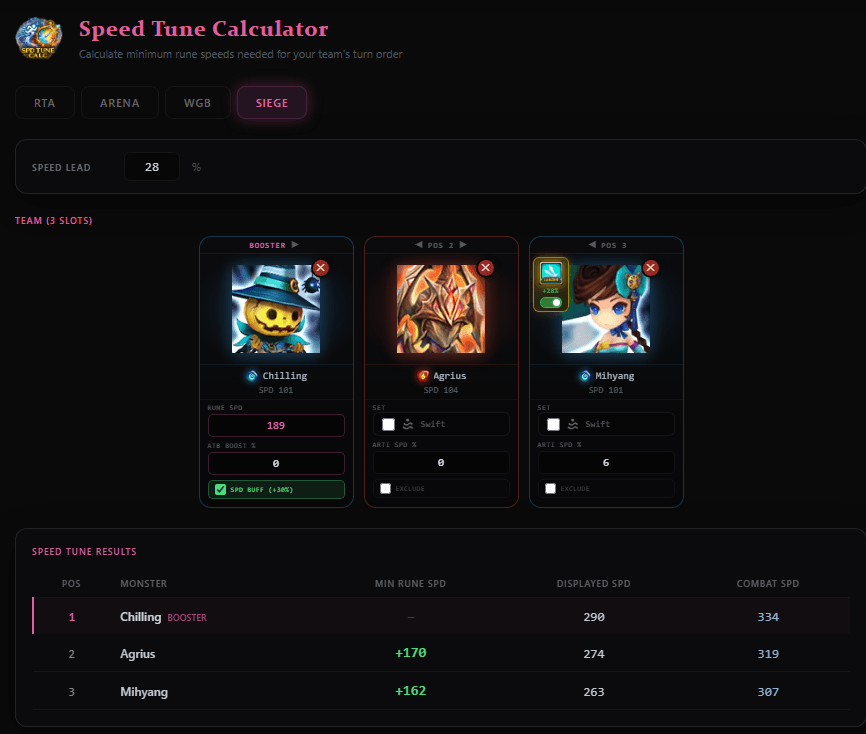
The calculator factors in speed leader skills (e.g., +28% Speed in Guild Content). Enter the leader skill percentage at the top — the calculator applies it to the base speed of all monsters when computing combat speed. Leader skills are validated by content type: Arena leaders only apply in Arena/RTA modes, Guild leaders only in WGB/Siege modes.
Speed Tower Bonus
The 15% Speed Tower bonus is always applied automatically. Every player is assumed to have a maxed speed tower, as it's one of the most important Glory Point purchases in the game. The formula: tower_bonus = floor(baseSpeed × 0.15)
Swift Set Handling
Followers using a Swift set (4+ Swift runes) get a 25% base speed bonus. The calculator accounts for this with precise fractional adjustments that match the game's internal floor-based calculations — ensuring the minimum rune speed is exactly correct for Swift users.
Artifact Speed % (SPD UP)
Artifact SPD UP substats amplify the speed buff effect. For example, 14% artifact SPD UP turns the standard 30% speed buff into an effective 34% buff. The calculator includes an input field for each follower's artifact speed percentage so the minimum rune speed accounts for this amplification.
RTA Mirror-Match Logic
In RTA, when using a speed buff booster with 0% ATB boost, the calculator uses a special mirror-match formula. This accounts for the scenario where both your booster and the enemy's booster move on the same tick — both applying speed buffs simultaneously. Your followers must outspeed the enemy booster's followers under these symmetrical conditions.
The Tick System
Summoners War uses an internal tick-based system to determine turn order. Every game “tick,” each monster's ATB (Attack Bar) increases by:
ATB gain per tick = combat_speed × tick_constantThe first monster to reach 100% ATB takes their turn. After a booster moves and applies an ATB boost or speed buff, the remaining monsters continue accumulating ATB each tick until they reach 100%. The calculator simulates this process to determine the exact minimum rune speed each follower needs to move before any enemy can cut in.
Combat Speed Formula
combat_speed = ceil(base_speed × (1 + 0.15 + lead_skill%/100)) + rune_speedWhere 0.15 is the speed tower bonus (15%) and lead_skill% is the speed leader skill percentage (0-50%). This is the speed value the game uses internally for all ATB calculations.
ceil() on the base component, small base speed differences between monsters can cause unexpected rounding effects. The calculator handles all these edge cases precisely.Input Parameters
Team-Level Inputs
- Content Mode: RTA (5 slots), Arena (4), WGB (3), or Siege (3)
- Speed Lead %: Leader skill speed bonus (0-50%)
Booster (Position 1)
- Base Speed: Monster's base speed stat (manual or auto-loaded from profile)
- Rune Speed: Total speed from runes only (includes slot 2 SPD primary, all SPD substats, innate, Swift bonus)
- ATB Boost %: How much attack bar the booster fills (0-100%) — auto-detected when selecting a known booster
- Speed Buff: Toggle for +30% speed buff — auto-detected for known speed buffers like Chilling
Followers (Position 2+)
- Base Speed: Follower's base speed stat
- Swift Set: Toggle if follower uses Swift (adds 25% base speed bonus)
- Artifact SPD %: Sum of SPD UP artifact substats — amplifies speed buff effect
- Exclude: Toggle to exclude specific monsters from speed tune constraints
Loading from JSON Profile
If you've imported your SWEX JSON, you can select monsters from your profile to auto-populate all fields. The calculator reads rune speed from the correct equipment pool based on the selected mode — RTA runes for RTA mode, siege runes for Siege mode, normal runes for Arena/WGB. Artifact speed percentages are also loaded from the correct artifact pool.
Speed Tune Results
The results table shows three key values for each monster:
The exact minimum rune speed needed. This is the number the optimizer uses as a SPD cap in the builder wizards.
Base speed + rune speed. What you see on the monster stat screen in-game.
The actual speed used for ATB calculations. Includes speed tower (15%) and leader skill bonuses.
The booster row shows a dash (—) for Min Rune SPD since it's the reference point — all follower speeds are calculated relative to the booster's speed and abilities.
Frequently Asked Questions
What is speed tuning in Summoners War?
Speed tuning ensures your monsters move in the correct order after your booster takes the first turn. It calculates the exact minimum rune speed each follower needs based on ATB boosts, speed buffs, leader skills, and the internal tick system — preventing over-investment in speed so the optimizer can maximize other stats.
Why do different content types have different tick constants?
Summoners War uses different tick constants for RTA (0.00015) vs standard content like Arena, WGB, and Siege (0.0007). This means the same combat speed produces different turn order results in RTA vs Arena. The calculator automatically applies the correct constant based on your selected mode.
What’s the difference between displayed speed and combat speed?
Displayed speed is base speed + rune speed (what you see on the stat screen). Combat speed includes the speed tower bonus (15%) and leader skill bonuses. Combat speed is what the game actually uses to determine turn order.
How do ATB boosts and speed buffs work differently?
An ATB boost directly fills your team’s attack bar by a percentage (e.g., Bastet 25%). A speed buff increases combat speed by 30% (amplified by artifact SPD%). They affect tick calculations differently — ATB boosts reduce the gap followers need to close, while speed buffs multiply their effective speed on subsequent ticks.
Can I use the calculator without importing a JSON file?
Yes. You can manually enter base speeds, rune speeds, and all other parameters. If you have imported a JSON file, you can also select monsters from your profile to auto-populate their stats from the correct equipment pool for each mode.
Is the standalone calculator the same as the one in the builder wizards?
They use the same underlying calculation engine. The builder wizards integrate speed tuning directly into the optimization flow — the calculated min speeds become SPD caps the optimizer respects. The standalone calculator lets you explore speed tuning independently and test hypothetical setups.
About the SWLens Speed Tune Calculator
The SWLens Speed Tune Calculator is a comprehensive Summoners War speed tuning tool that calculates exact minimum rune speeds for perfect turn order in all content types. Supporting RTA, Arena, WGB, and Siege with their unique tick systems, it handles ATB boosts, speed buffs, leader skills, Swift sets, and artifact speed percentages. Available as a standalone tool and integrated into all Builder Wizards where calculated speeds become automatic SPD caps for the rune optimizer. Whether you need to speed tune an RTA cleave team or ensure your siege defense moves in order, the calculator gives you the exact numbers. Load monsters from your SWEX JSON profile or enter values manually to explore combat speed and tick bracket requirements.
Ready to Perfect Your Turn Order?
Calculate exact speed requirements for your teams. Free to use — no credit card required.
 Try for Free
 Download