
My Monsters
On this page11
What is My Monsters?
My Monsters is the part of SWLens about your own box. Open it from the sidebar (General → My Monsters; on phones under More). It needs you to log in and to import your SWEX JSON — see the SWEX guide. Without a file it explains what it shows and offers Import JSON. It is free: no Premium plan and no tokens.
Monsters & Equipment
Monster analytics
Missing monsters
Devilmon priority
Summon log
(default)“Every monster in your box with its runes and artifacts”?tab=analytics“Your collection at a glance — totals and filters across your whole box”?tab=missing“The monsters you don’t own that would unlock the most teams”?tab=devilmon“Which monsters to feed Devilmon first”?tab=summons“Every natural 5★ you’ve summoned, by date and source”The selected tab is kept in the address (/webapp/my-monsters?tab=…), but each tab’s filters and sorts reset when you switch tabs or reload.
The account totals strip

Monsters & Equipment
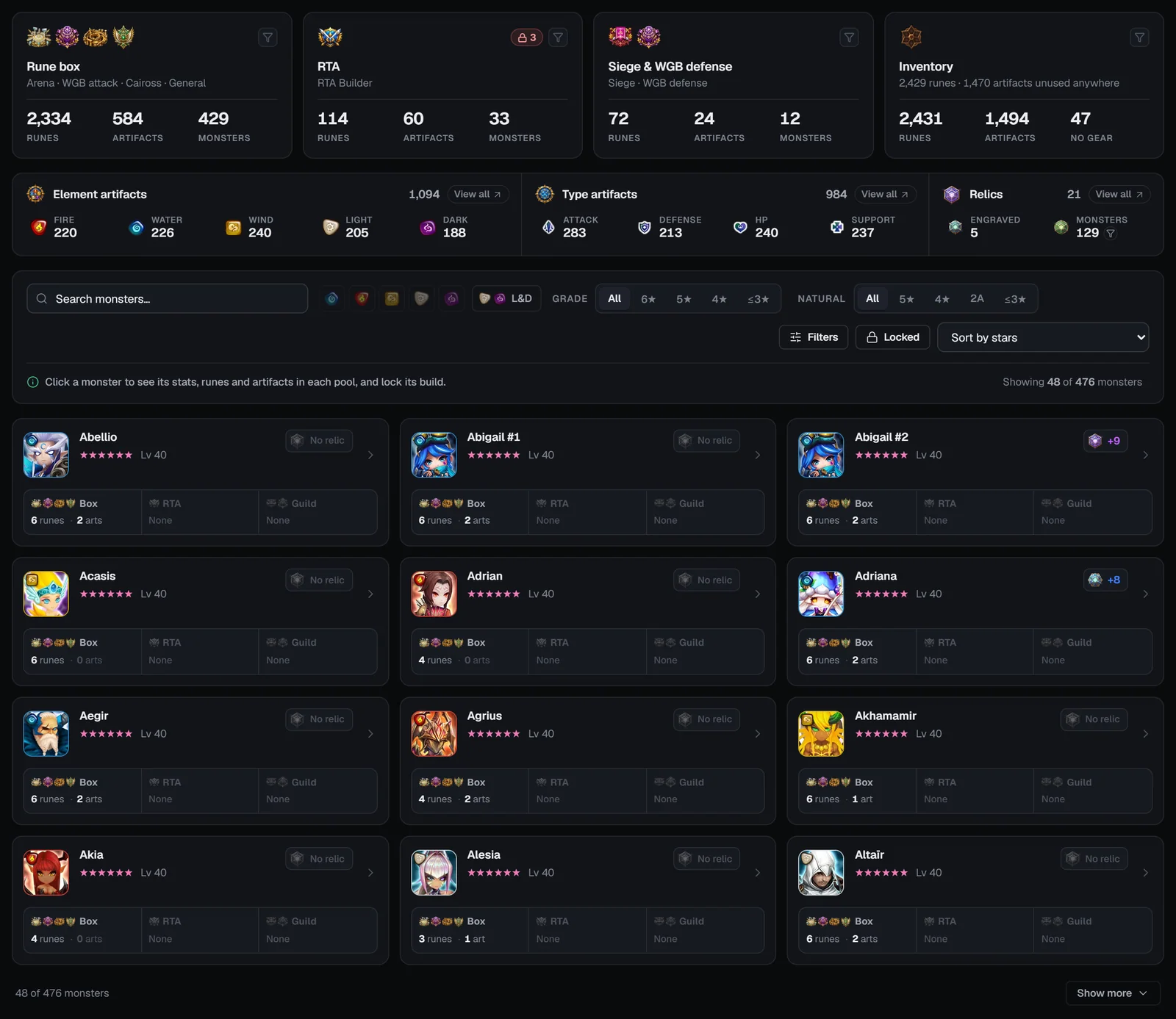
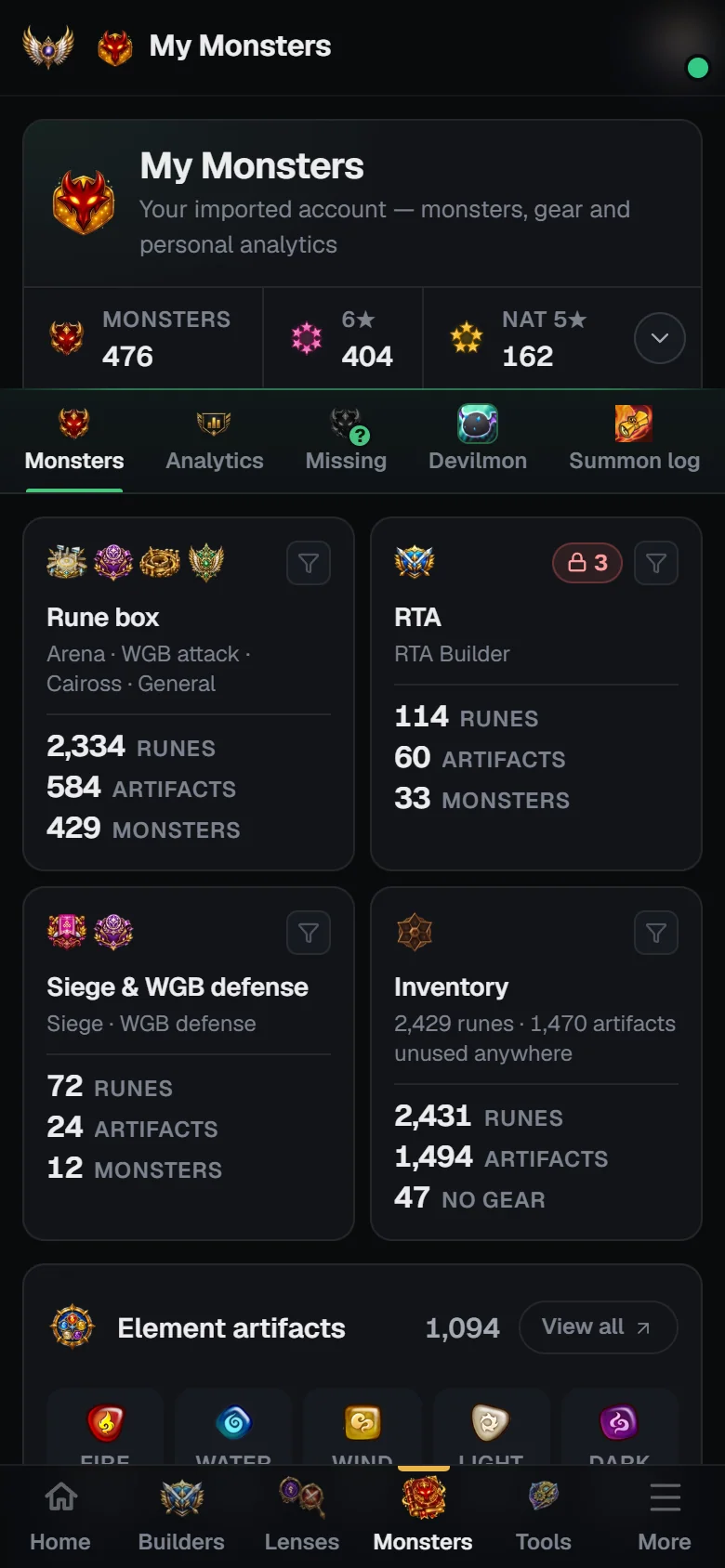
Pool tiles
Summoners War keeps separate gear setups; each tile is one of them. Click a tile to show only its monsters.
Each tile counts the Runes, Artifacts and Monsters using it, and a red lock pill counts the monsters whose build there is locked. Below the tiles, the Artifacts & relics strip counts your element artifacts (Fire, Water, Wind, Light, Dark), type artifacts (Attack, Defense, HP, Support) and relics — click a count for a filterable list, or the relic Monsters count to show only monsters with a relic engraved.
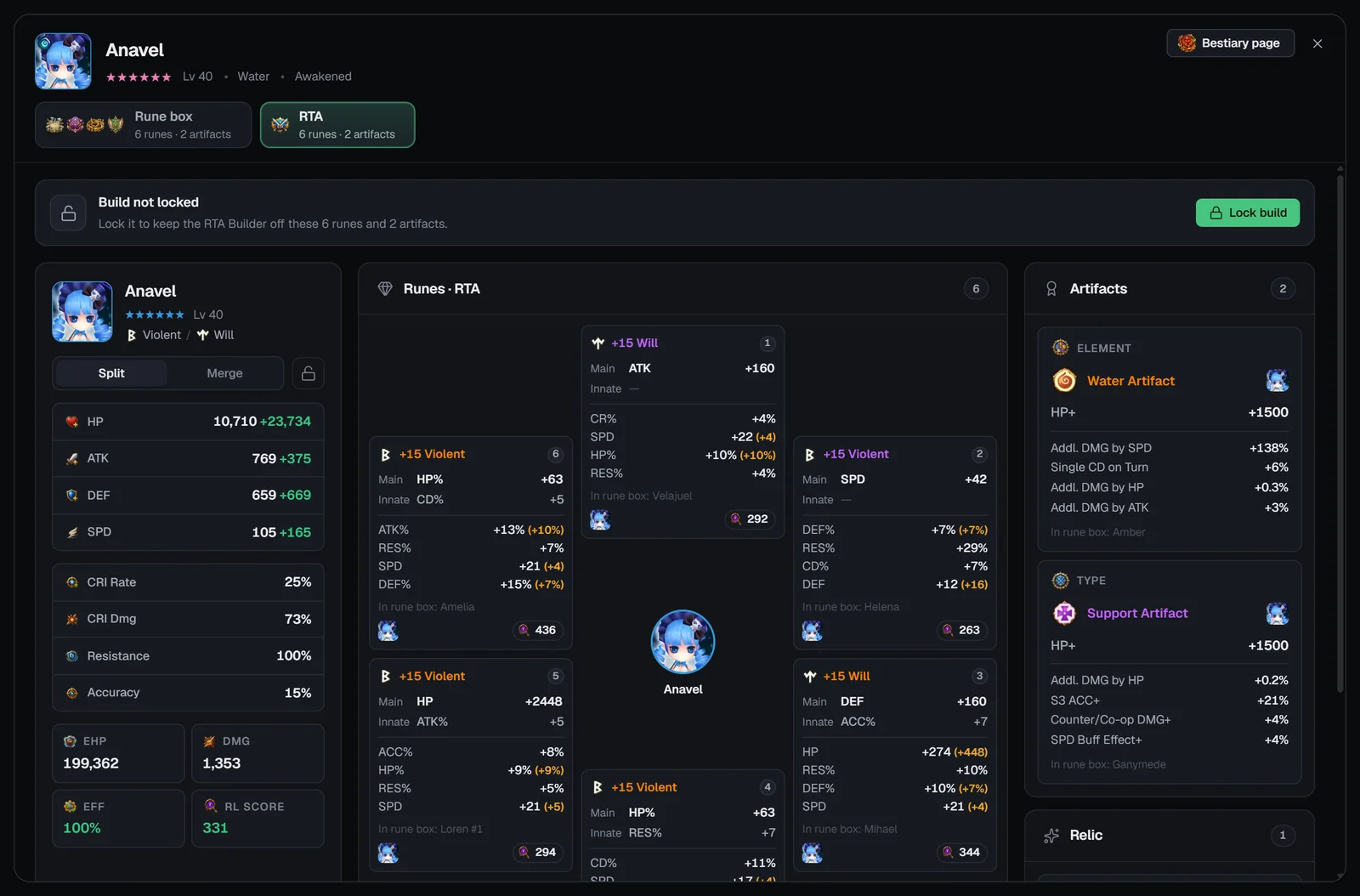
Toolbar
A line under the toolbar counts “Showing N of M monsters” with chips for each active filter and Clear filters. The grid shows 48 monsters at a time with Show more.
Monster cards
- Portrait, name (copies numbered #1, #2), stars (pink at 6★) and level.
- Tags: Unawakened or 2A, Siege def and Arena def if it is on those defenses, and its speed when sorting by speed.
- With the Skill-ups need or the Devilmon sort: the Devilmons it still needs (“×N”, “Max”, or “Other copy … is maxed”) and “N cooldowns left” / “Cooldowns done” / “Not your best copy”.
- A relic pip (“+level”, or “No relic”) when your export includes relics.
- The pool strip Box | RTA | Guild — “N runes · N arts” per pool, with a red (locked) or amber (partly locked) lock. Click a cell to open that pool.
The monster popup and locks
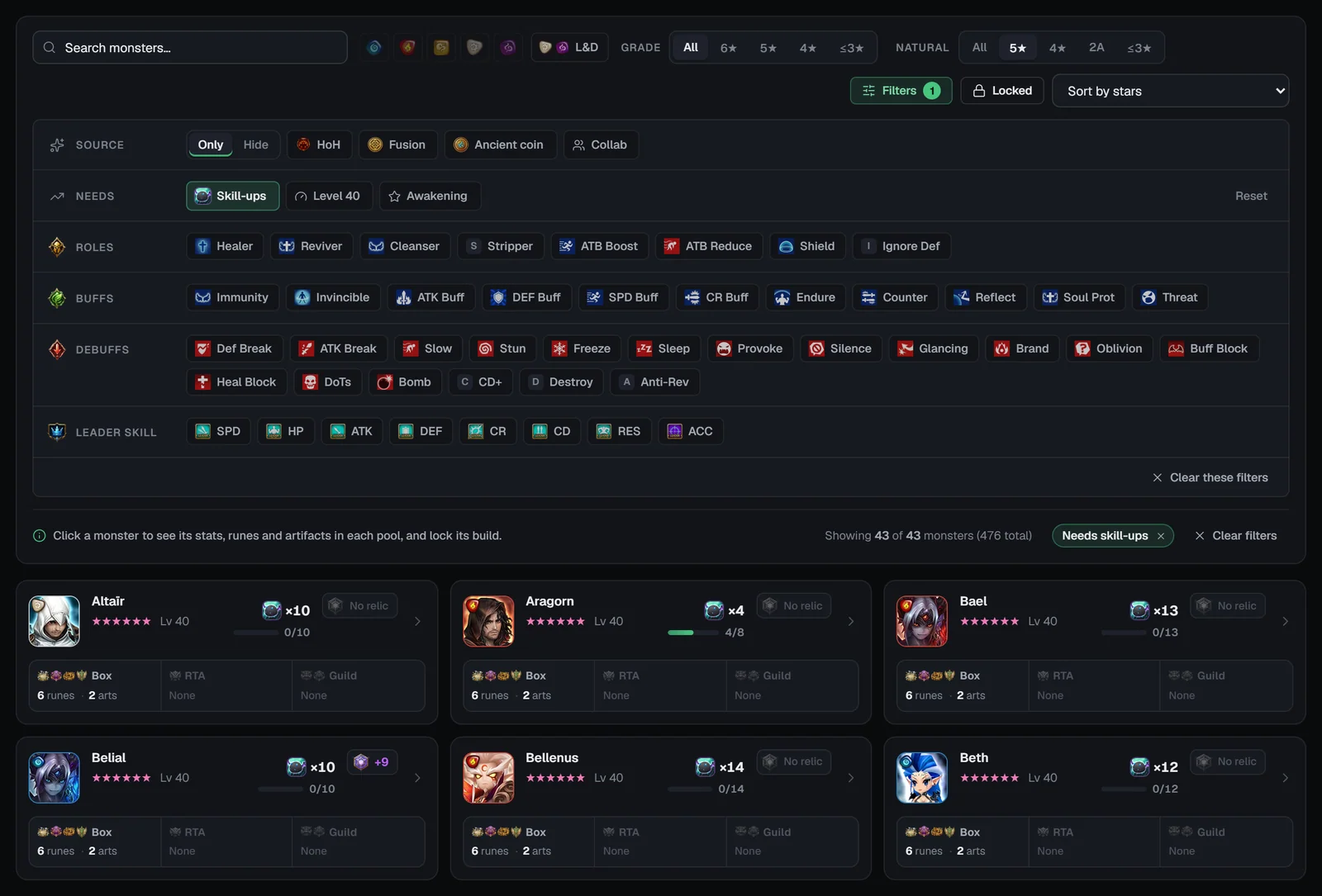
Click a monster to open its popup: stars, level, element and awakening, Siege / Arena defense badges and a Bestiary page button. A switcher shows each pool the monster has gear in (Rune box first) with “N runes · N artifacts” and its lock state. For the selected pool you get:
- Stat card — set names, Split (base + bonus) or Merge (totals), HP, ATK, DEF, SPD, CRI Rate, CRI Dmg, Resistance, Accuracy, and EHP, DMG, EFF (average rune efficiency) and RL score (average Rune Lens score). Relic effects aren’t included in these stats.
- Runes — the rune flower with each rune’s RL score; in the RTA and guild views a note says where each piece sits in your normal rune box (“In rune box: …”).
- Artifacts and Relic — the relic’s level, main property, durability and how many monsters it is engraved on.
Locking a build
The lock bar reads “Build not locked” with Lock build, or “Build locked” with Unlock build. A lock keeps that pool’s 6 runes and 2 artifacts out of the optimisers that use the pool:
Monster analytics
Analytics counts each monster once, whatever versions you own: a collab and its original, and the unawakened, awakened and 2A forms, are one monster. Devilmon numbers count one copy per monster and skip monsters with a max-skilled copy.
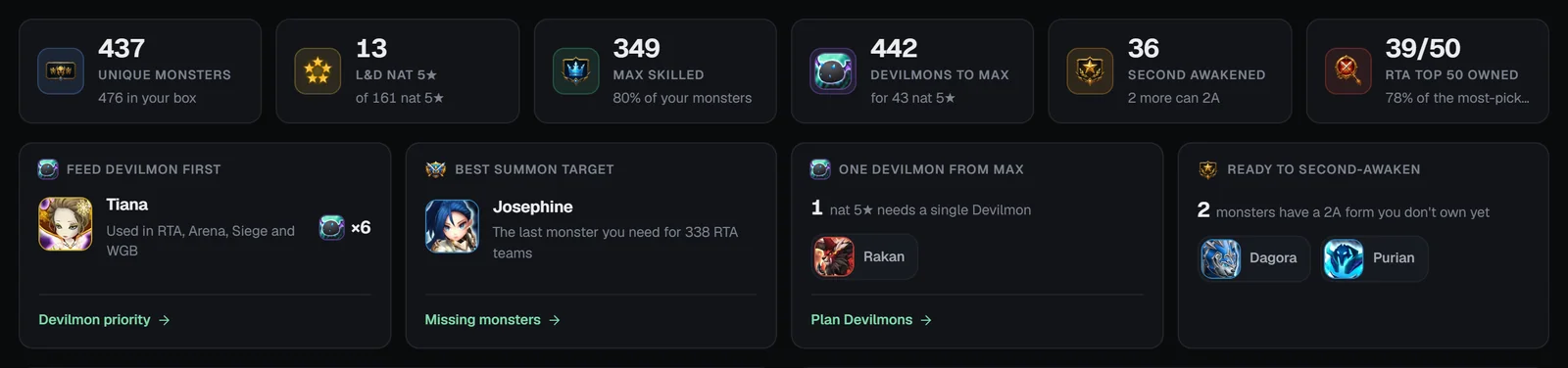
Highlights
- Feed Devilmon first — the top pick across all contents (as on the Devilmon tab), with a link to Devilmon priority.
- Best summon target — “The last monster you need for N RTA teams”, linking to Missing monsters.
- One Devilmon from max — nat 5★ monsters a single Devilmon would max; a clock marks a last skill-up that cuts a cooldown.
- Ready to second-awaken — monsters with a 2A form you don’t own yet.
Breakdowns
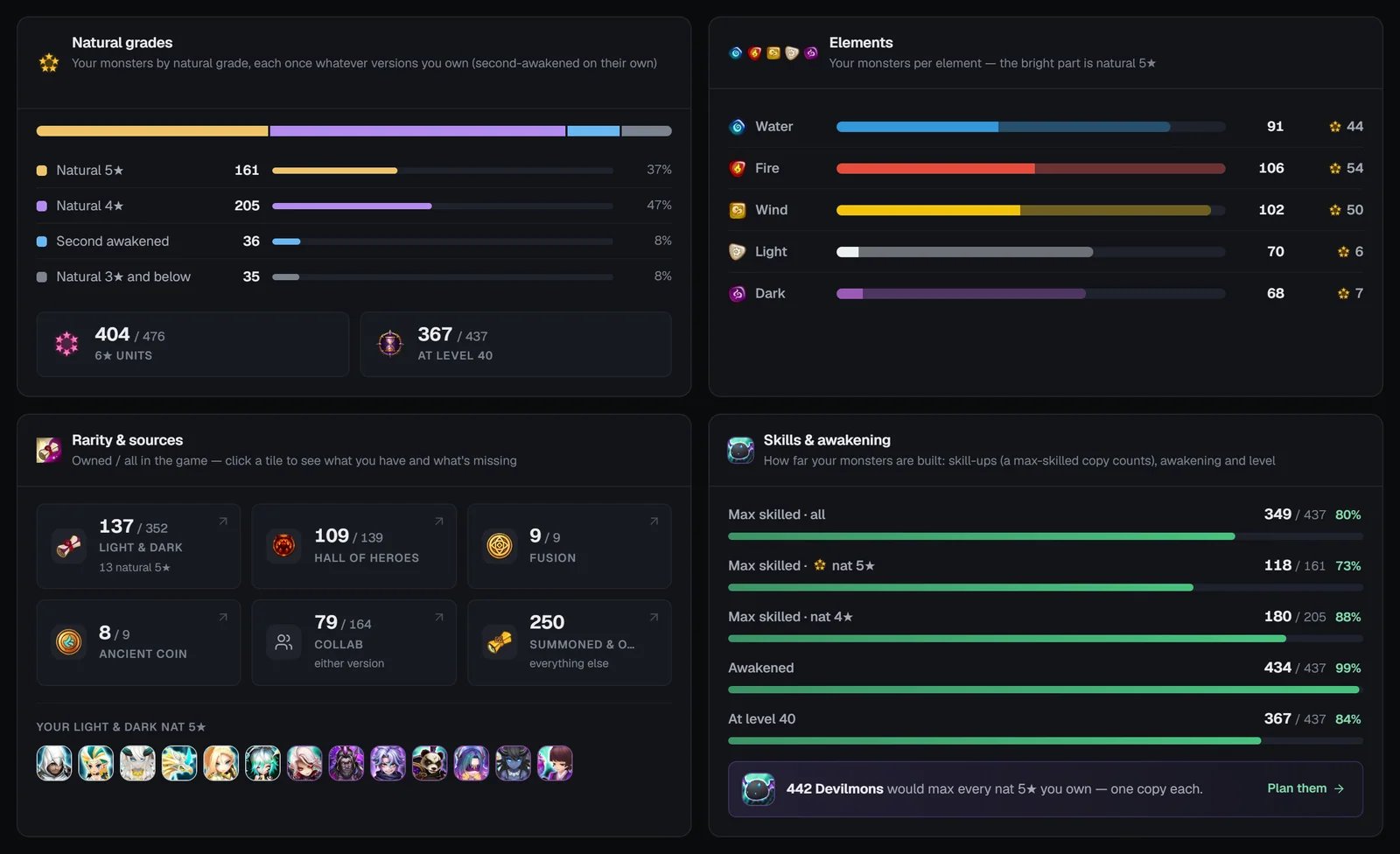
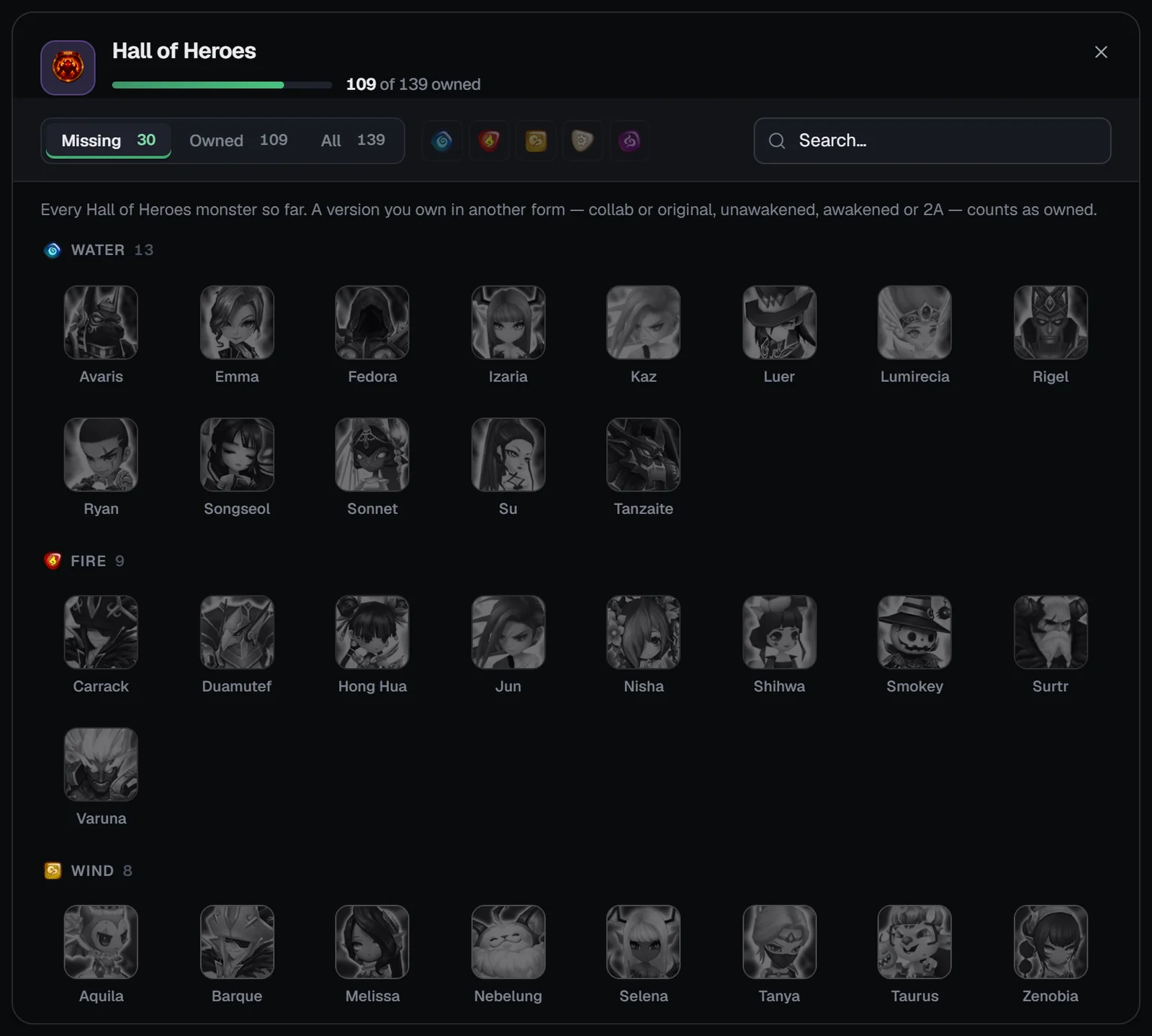
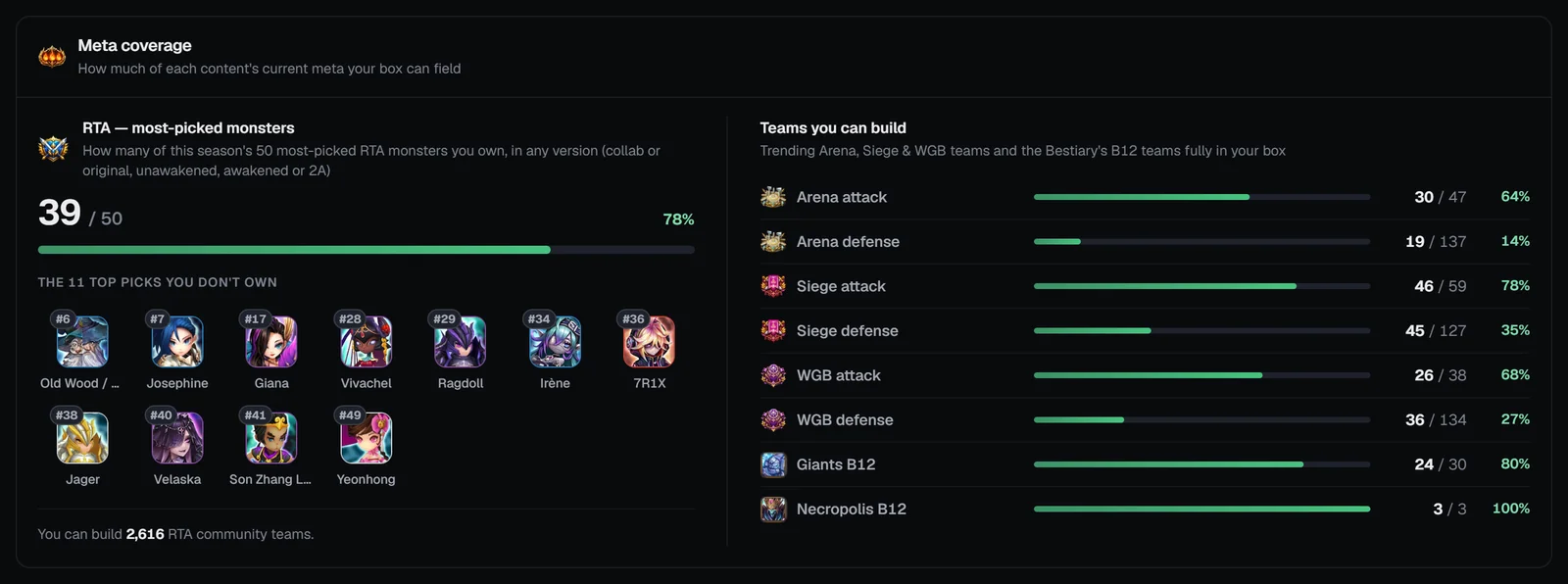
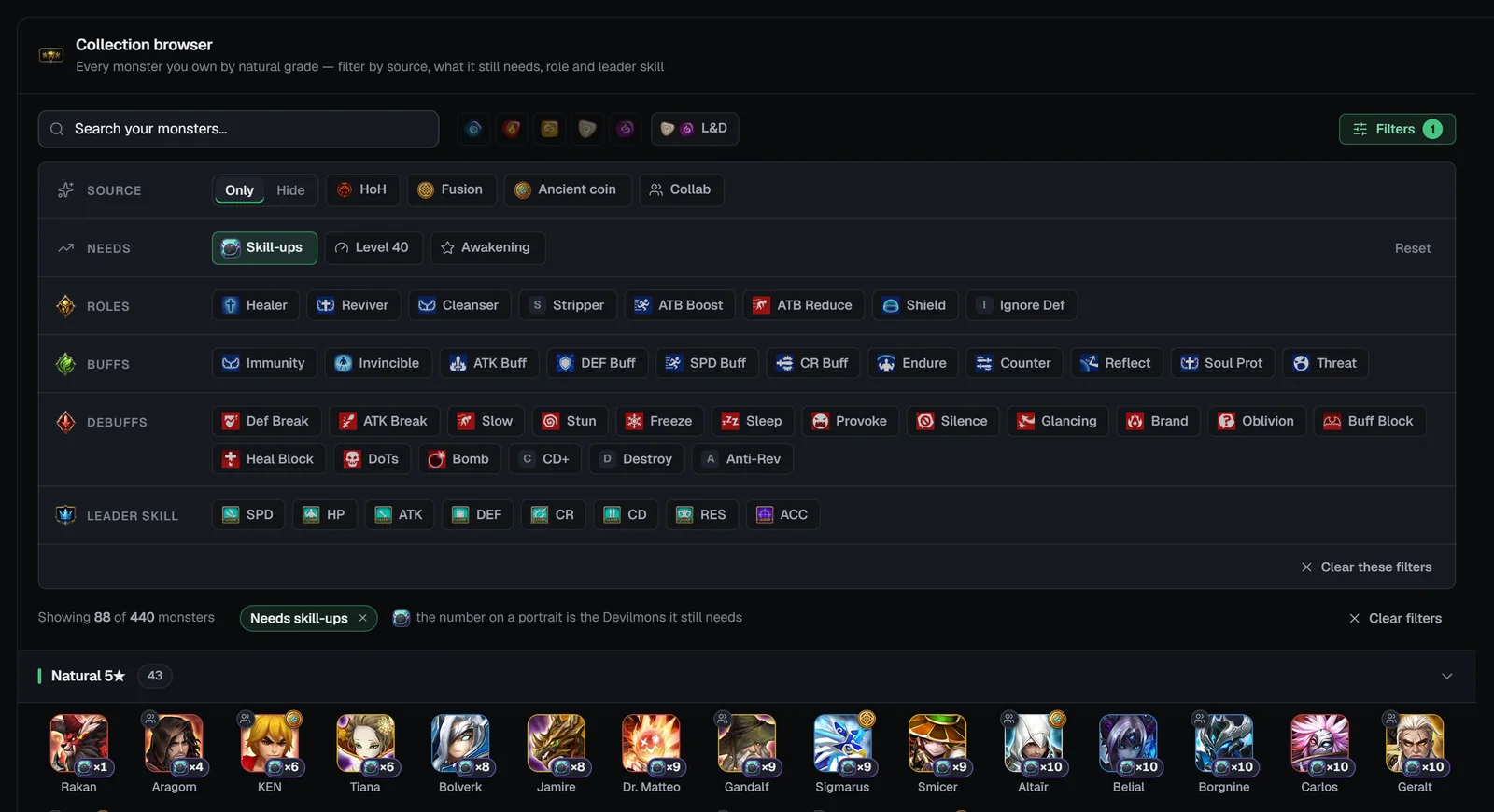
Missing monsters
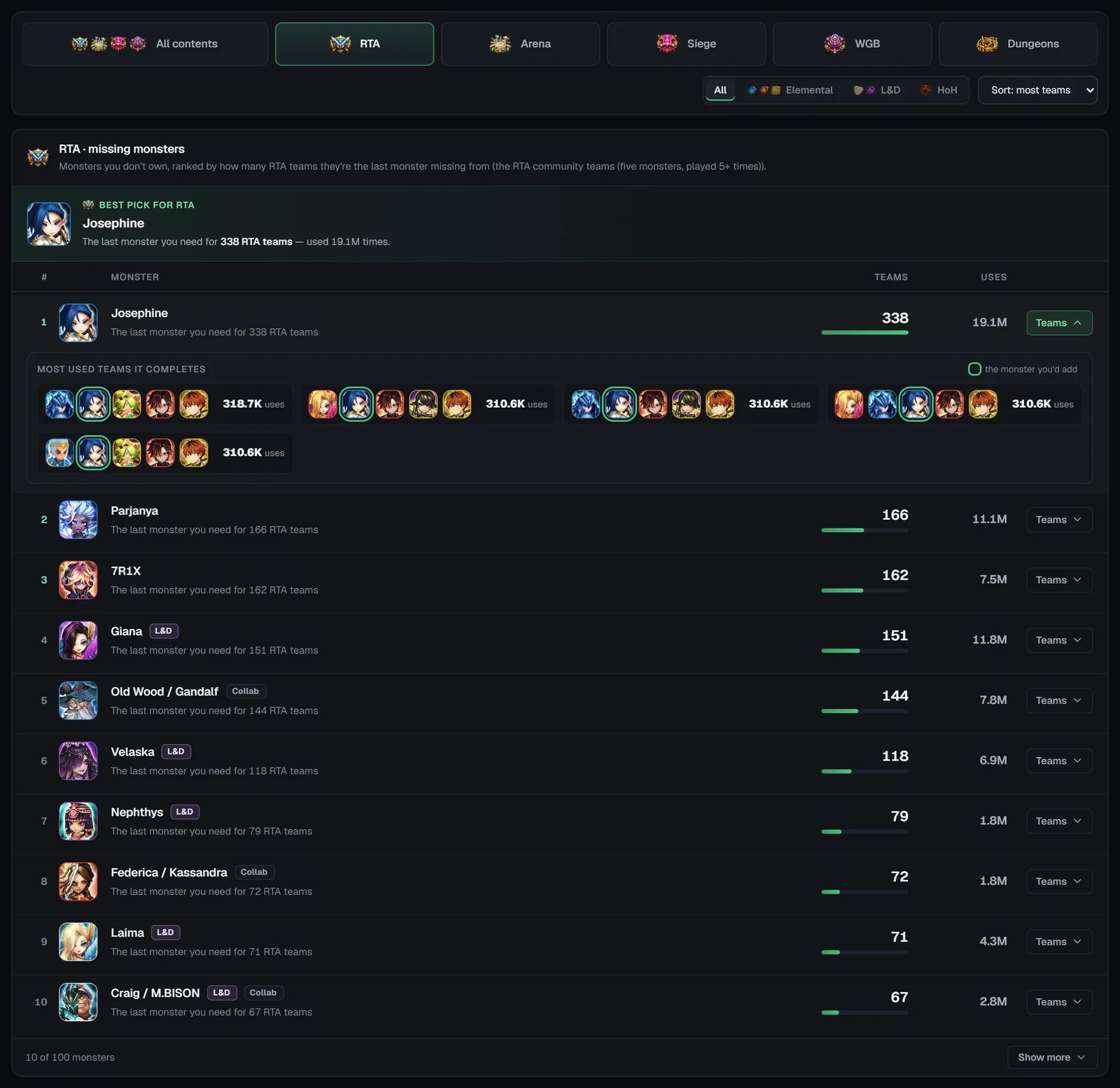
A monster is missing when you don’t own it and it is the only member you lack in a team. Owning any version of it counts. Each list ranks up to 100 monsters by how many teams they would complete, then by those teams’ usage.
A banner names the Best pick — “The last monster you need for N … teams”. Each row shows the monster with its tags, the teams it completes and their usage, and a Teams toggle that lists the top five teams it would complete, with the monster you’d add marked.
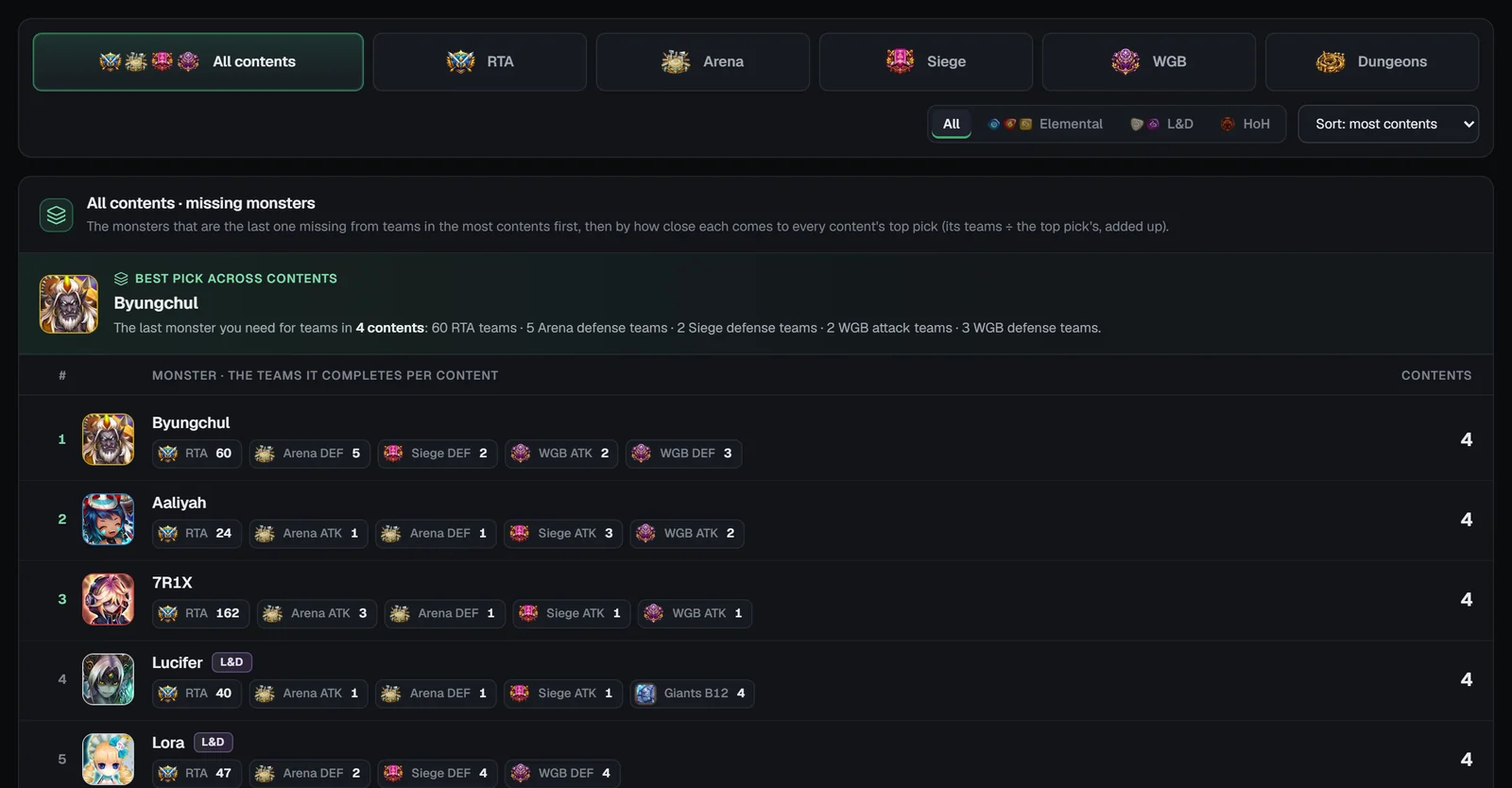
All contents lists the monsters that complete teams in the most contents first, then by how close each comes to every content’s top pick, with a chip per content (e.g. “Arena ATK 12”) that opens it.
Devilmon priority
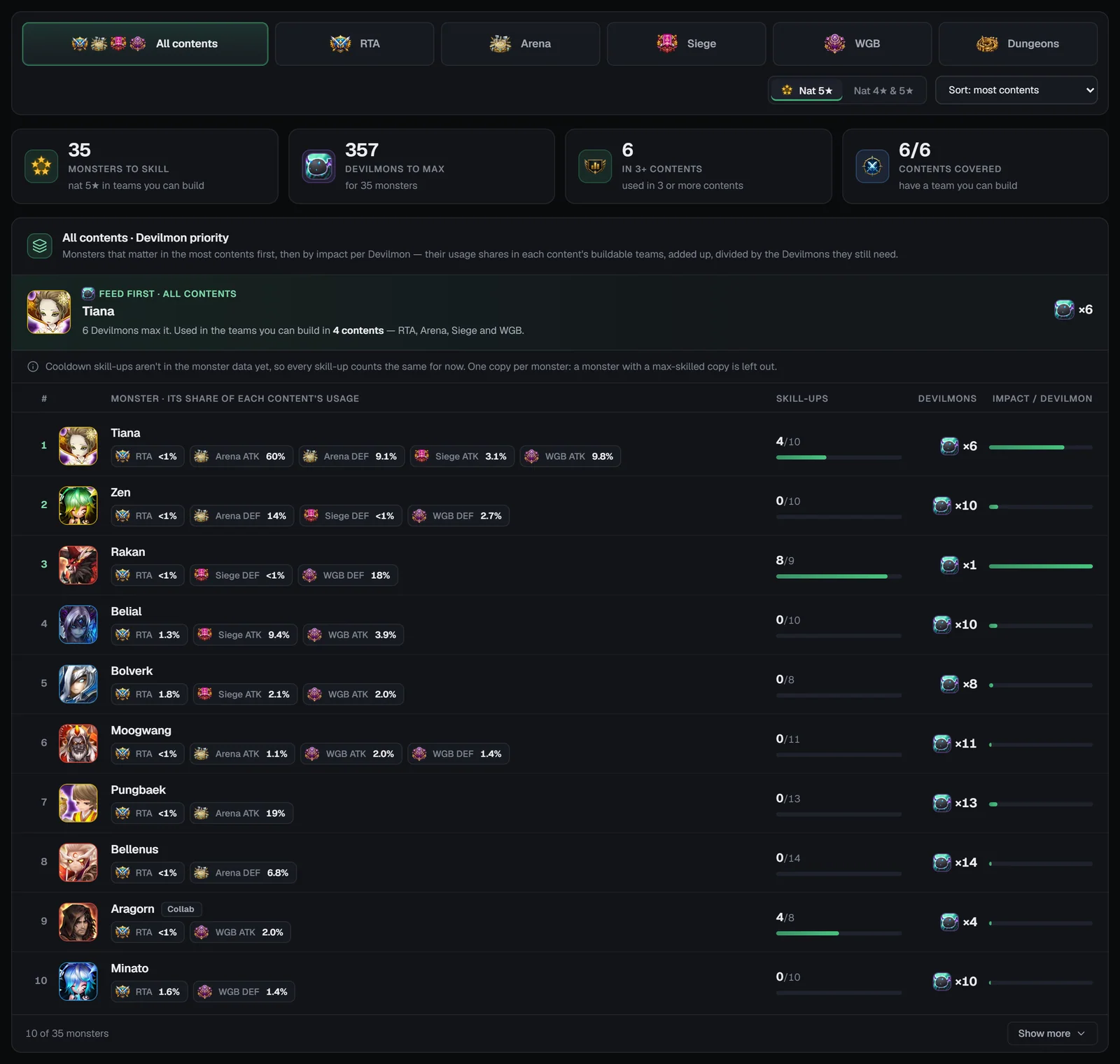
A Devilmon raises a random skill that isn’t maxed, and the skill-ups that matter most are the ones that cut a cooldown. Devilmon priority ranks your monsters by how much each Devilmon is likely to help the teams you play:
- Which copy: monsters with a max-skilled copy are left out; a copy that already has every cooldown goes to Low priority; otherwise your most skilled copy counts.
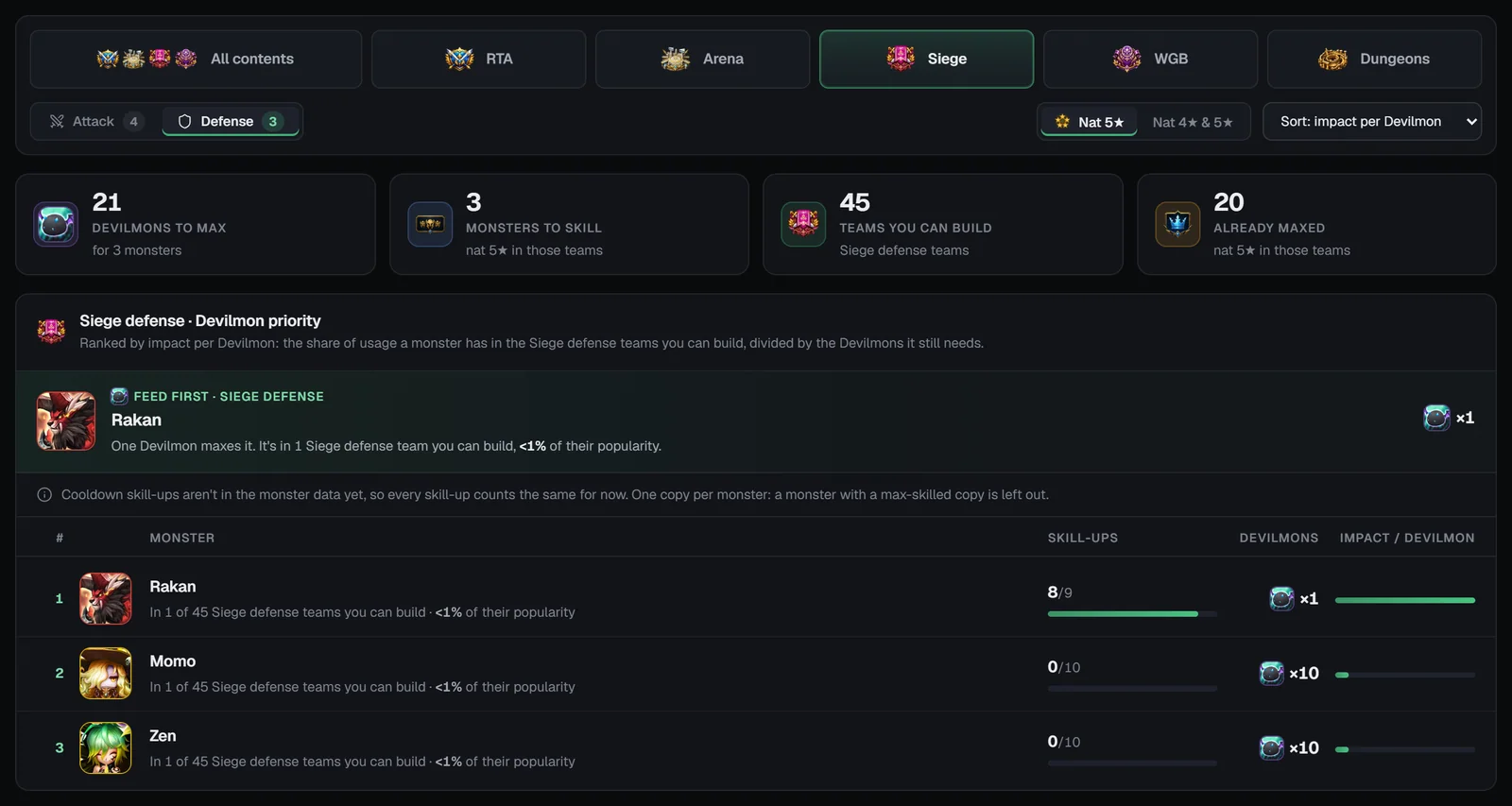
- Share: the usage of the teams you can already build in that content that include the monster, divided by the usage of all your buildable teams there.
- Priority: share × cooldown skill-ups left ÷ the Devilmons the monster can take (the worst case, since skills are random).
Tiles count Cooldowns left, Devilmons to max, Teams you can build and Cooldowns done. The Feed first banner explains the top pick, e.g. “2 cooldown skill-ups left — up to 5 Devilmons get them. It’s in N teams you can build, X% of their uses.” Each row shows the monster, “N copies”, the plan (“N cooldown skill-ups left” or “Cooldowns done · 3 left: Damage ×2…”), how many of your buildable teams it is in, the Devilmons it needs and a priority bar. Monsters with every cooldown in, and monsters without skill details, are listed separately.
Summon log
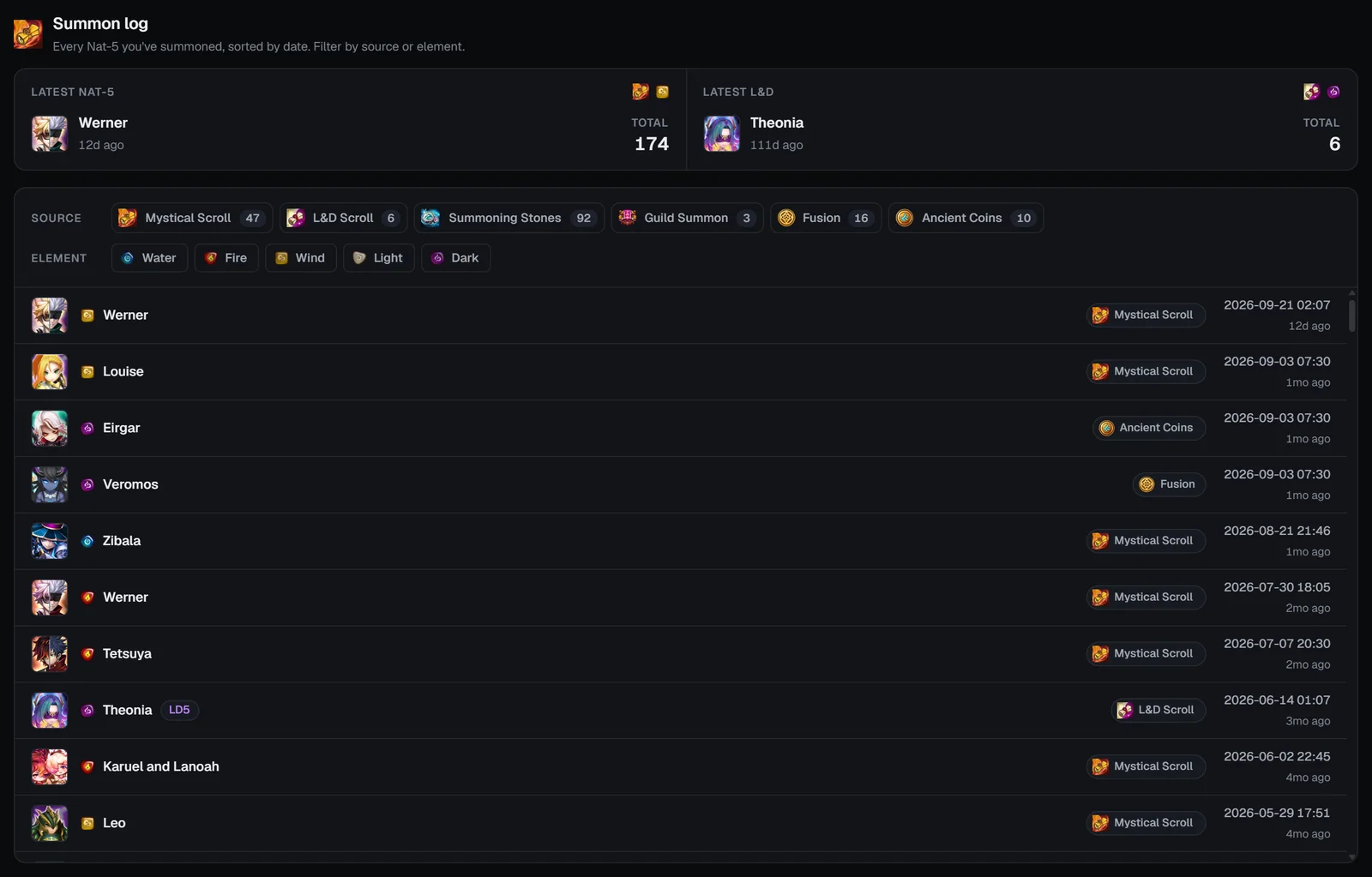
“Every Nat-5 you’ve summoned, sorted by date.” The log is built from the natural 5★ monsters in your box and the date each joined your account:
- Latest Nat-5 and Latest L&D tiles show how long ago each was and the totals (or how long you’ve been dry since your account started).
- Source chips (Mystical Scroll, L&D Scroll, Summoning Stones, Guild Summon, Fusion, Ancient Coins) and Element buttons filter the list, one of each at a time.
- Each row shows the monster, an LD5 badge for Light & Dark, the source, and the date with how long ago.
Connections to the Bestiary and the builders
Bestiary
Every portrait and name in My Monsters opens the monster’s Bestiary page, and the popup has a Bestiary page button — handy to check a missing monster’s builds and teams before summoning.
The home dashboard’s Monster collection card links to Monster analytics, and old Bestiary links to the summon log or monster analytics open My Monsters.
On phones
- The tabs stay pinned with short names (Monsters, Analytics, Missing, Devilmon, Summon log) and the totals fold to one line.
- Pool tiles sit 2 × 2; filters open in a bottom sheet with “Show N monsters”; cards are one per row.
- The monster popup opens full screen with a Bestiary button; source lists open full screen too.
- Missing and Devilmon rows become cards with a labelled Teams toggle.
Frequently asked questions
What do I need to use My Monsters?
A free SWLens account and your SWEX JSON imported. My Monsters reads your account file; there is no Premium requirement and no tokens are used.
How does Devilmon priority decide who to feed first?
For each monster it looks at the teams you can already build in a content, how much of their usage includes that monster, and how many cooldown skill-ups it still needs. Because a Devilmon levels a random skill, it divides by the number of Devilmons the monster can take, so the list favours monsters where each Devilmon is most likely to buy a useful cooldown.
What counts as a “missing” monster?
A monster you don’t own that is the only member you lack in a team. The list ranks them by how many teams each would complete, then by those teams’ usage, so the top entry unlocks the most teams for you.
Why doesn’t the summon log show every Nat-5 I summoned?
It is built from the natural 5★ monsters still in your box, using the date each one joined your account. Monsters you sold or fed are gone from the export, and the summon source (scroll, stones, fusion, etc.) is estimated from the monster.
What does locking a build in My Monsters do?
It keeps that monster’s runes and artifacts out of the optimisers that use the same rune pool: Rune box locks apply to Arena, WGB attack, Caiross and the General Optimizer; RTA locks to the RTA Builder; guild locks to Siege and WGB defense.
Why does the Nat 5★ count differ between the header and Monster analytics?
The header counts every distinct natural 5★ monster ID you own, so an unawakened and an awakened copy, or a collab and its original, count separately. Monster analytics counts each monster once, whatever versions you own.
Do I need to re-import after summoning or using Devilmons?
Yes. My Monsters reads your latest SWEX JSON, so export and import a fresh file to see new monsters, skill-ups and gear.
Related guides


About SWLens My Monsters
SWLens My Monsters turns your SWEX JSON into a Summoners War account tracker. See every monster with its runes and artifacts in the rune box, RTA and guild pools, and lock builds so the optimisers leave them alone. Monster analytics sums up your collection, rarity and sources, skills and meta coverage. Missing monsters finds the summon that completes the most teams, Devilmon priority shows who to feed first for the most useful cooldowns, and the summon log lists every natural 5★ in your box by date.
See your whole box
Import your SWEX JSON and find your next summon target, Devilmon and lock in minutes — free.
 Log in