
Monster Bestiary
On this page19
What’s in the Bestiary
Open Bestiary in the sidebar (or go to /webapp/bestiary). The page is public — no login or SWEX JSON — and has two tabs: Home, with the RTA meta and the trending teams for every content, and All monsters, a sortable table of every monster. Click any monster anywhere to open its monster page.
Monster search
RTA meta overview
Trending teams
All monsters table
Monster pages
Builder hand-off

The header’s stats strip counts what the data covers: Seasons (the range of RTA seasons recorded, such as 36–38), Battles and Players (every recorded RTA battle and player), Monsters, and the number of Siege, WGB, Arena, RTA and Dungeon teams in the community team lists.
Searching for a monster
Type in Search monsters… at the top right of the header. Results appear as you type (from two letters on), up to ten at a time:
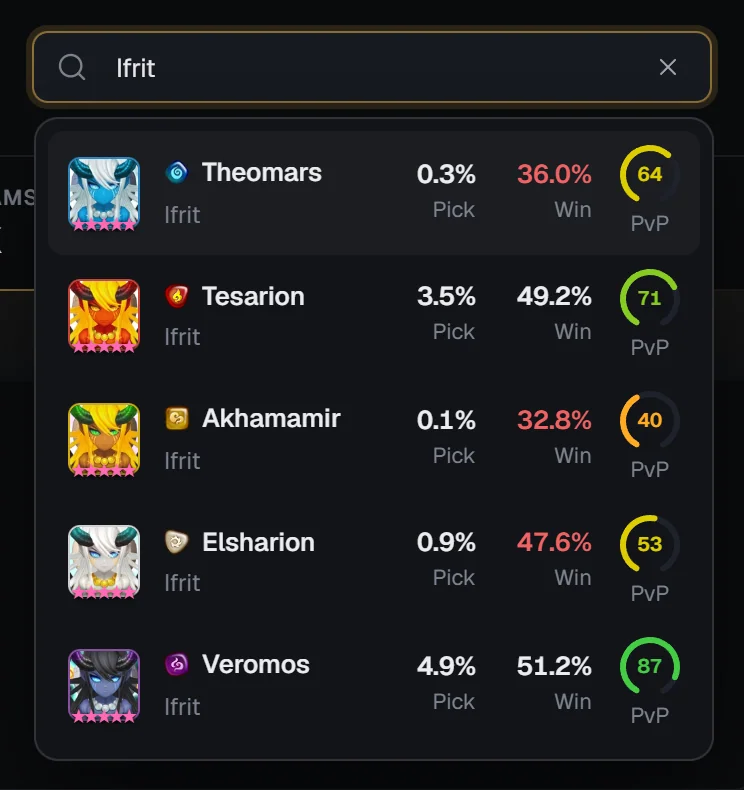
- Names and family names both match, so “Ifrit” lists every Ifrit, and the unawakened name finds the awakened monster.
- Dots and spaces don’t matter (“dr plasma” finds Dr. Plasma), and collab names work: “RYU” finds the merged “Moore / RYU”.
- Only awakened forms are listed; when a second awakening exists you get the “(2A)” entry.
Each result shows the portrait with its natural stars, the element and family, the RTA Pick and Win rates (win rate green at 52%+ and red at 48% or less) and a PvP gauge — the monster’s overall usage score. Use ↓ / ↑ and Enter, or click a result, to open the monster page; Esc closes the list.
The Home tab
Home stacks four sections, top to bottom: RTA meta overview, Popular RTA & Arena teams, Trending guild teams & defenses and Trending Caiross dungeon teams, followed by an About box. While the data loads you’ll see “Loading the bestiary”.
RTA meta overview
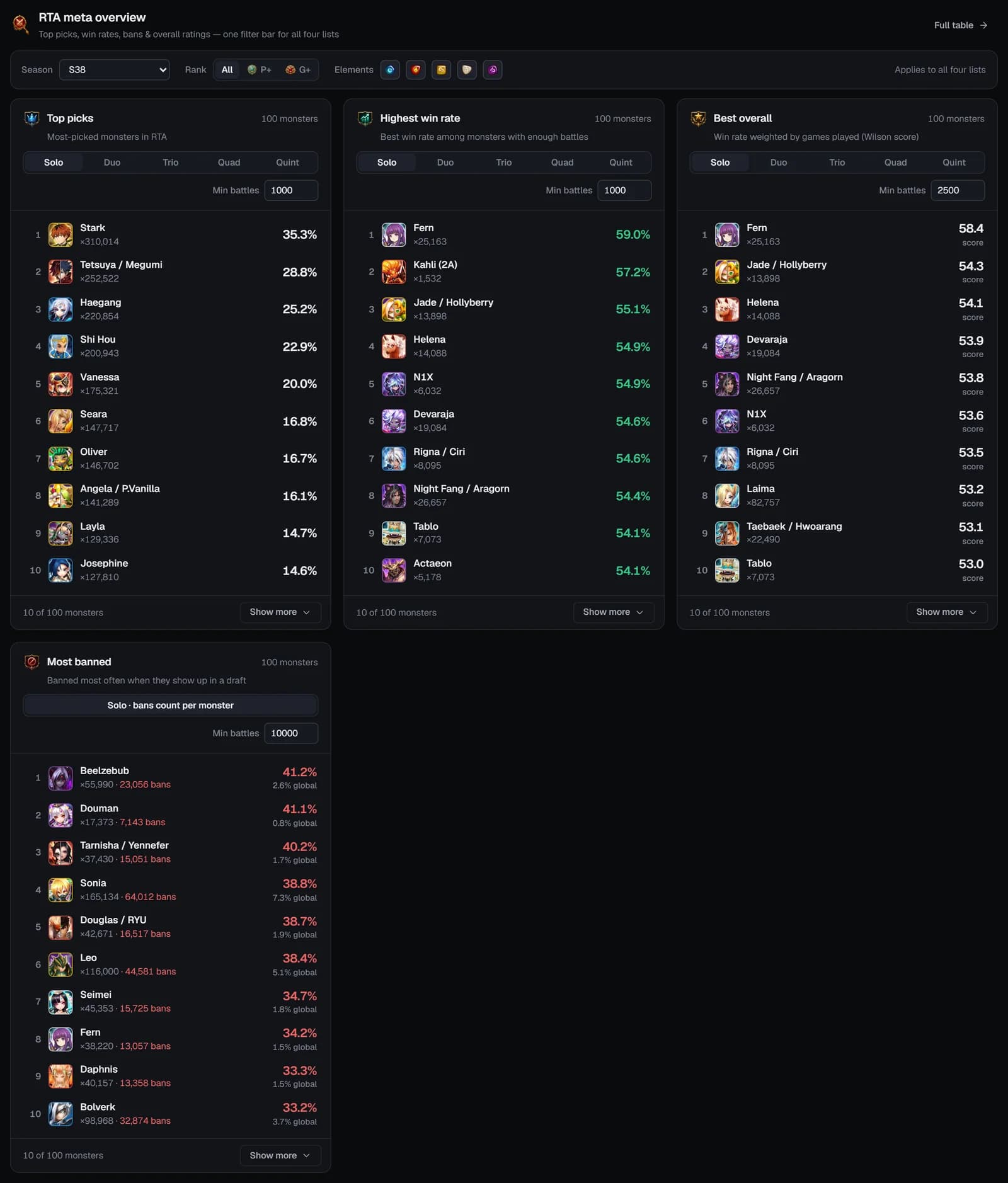
“Top picks, win rates, bans & overall ratings — one filter bar for all four lists.” The Full table button jumps to the All monsters tab.
The filter bar
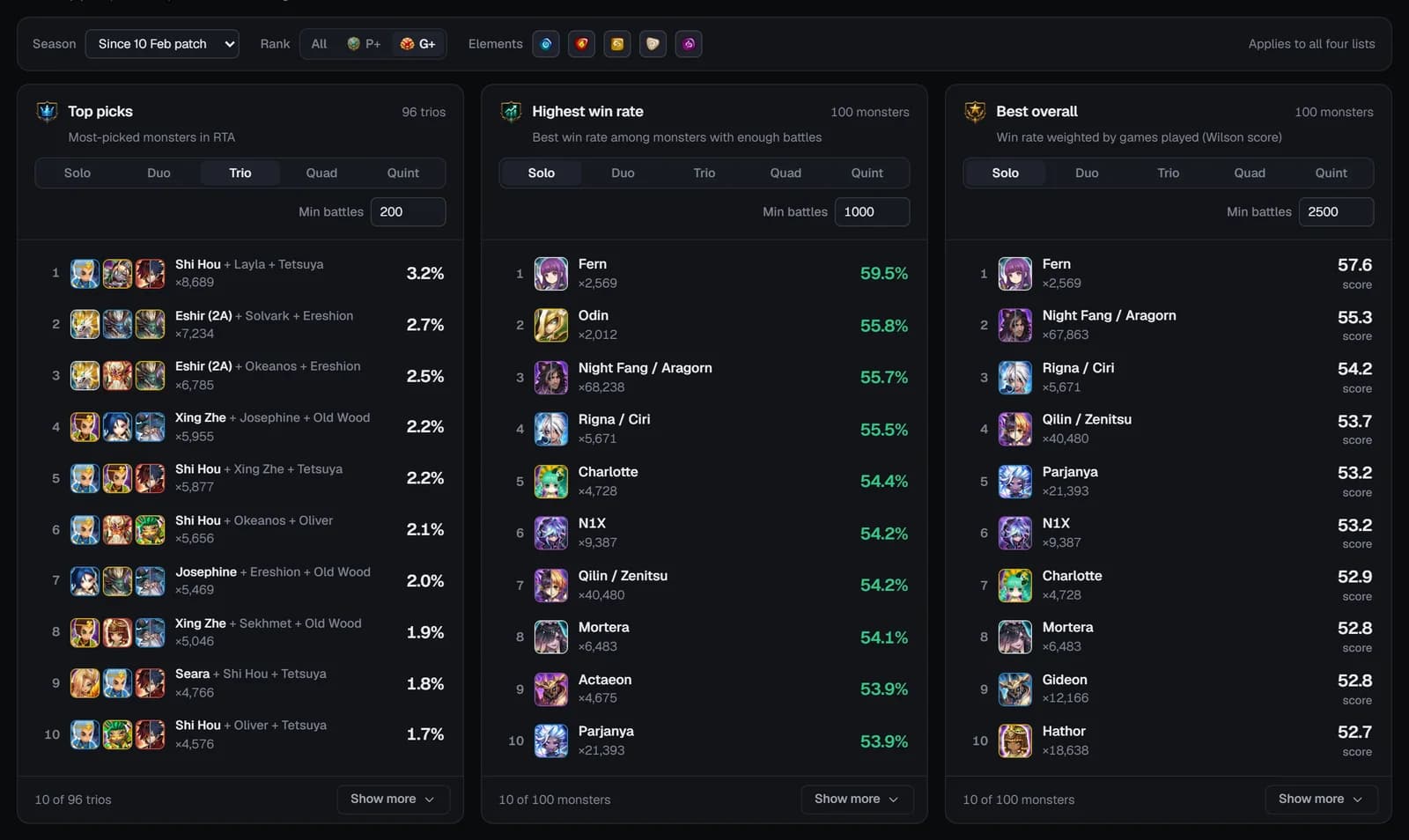
Changing the season or rank reloads all four lists (“Applies to all four lists”).
The four lists
- Solo / Duo / Trio / Quad / Quint switch Top picks, Highest win rate and Best overall from single monsters to teams of 2–5 that are picked together (“A + B”). Bigger teams lower the minimum to 500 / 200 / 100 / 50 battles.
- Min battles sets each list’s minimum sample.
- Lists open at 10 rows — Show more goes up to 100. Click a monster to open its page.
Teams on the Home tab
Popular RTA & Arena teams
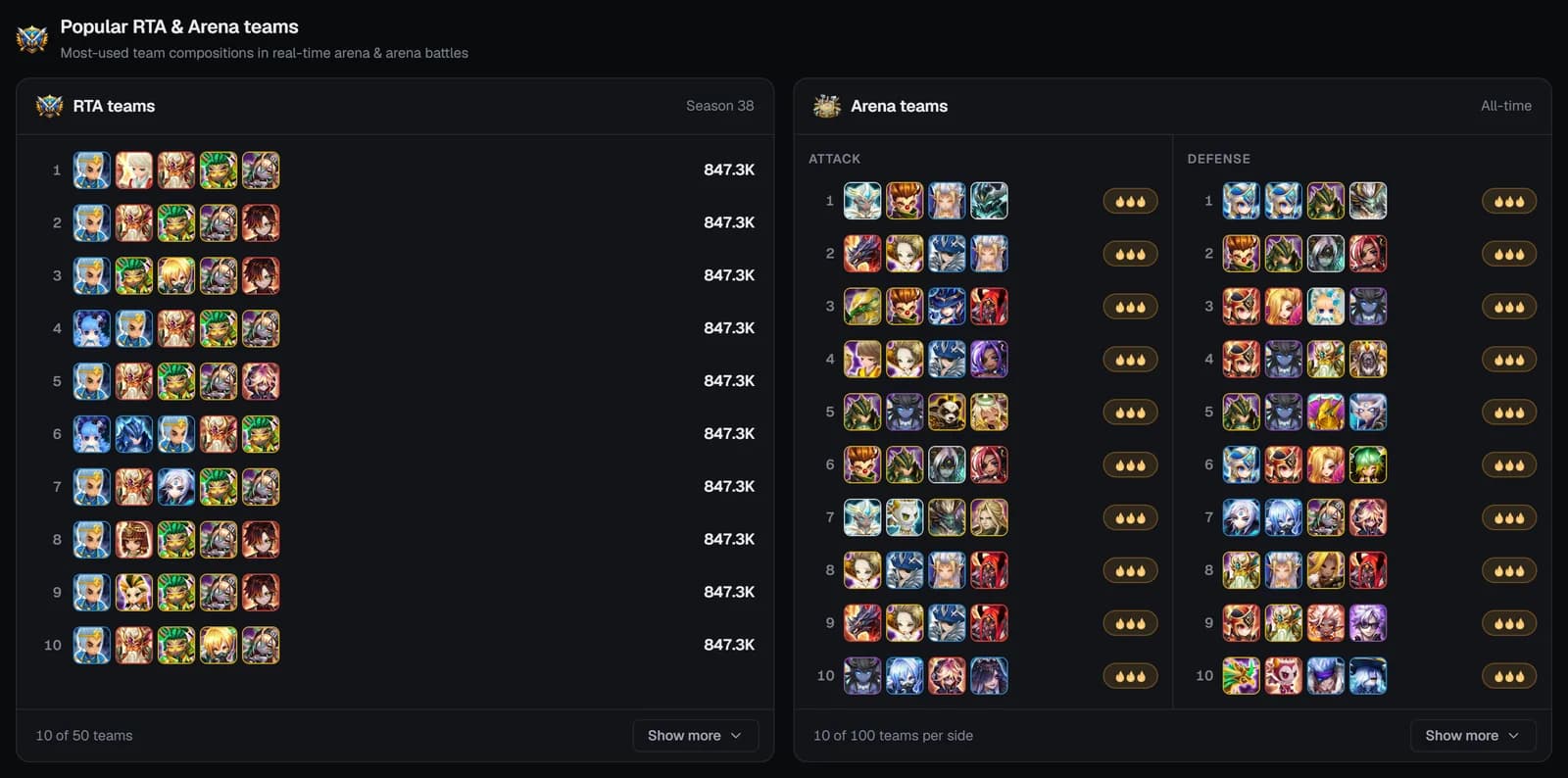
- RTA teams — up to 50 five-monster teams ranked by how often they’re used (the count shows as “1.2K”; hover for the exact number).
- Arena teams — Attack and Defense columns: SWLens trending teams first (3 → 2 → 1 flames), then community teams by usage, up to 50 each.
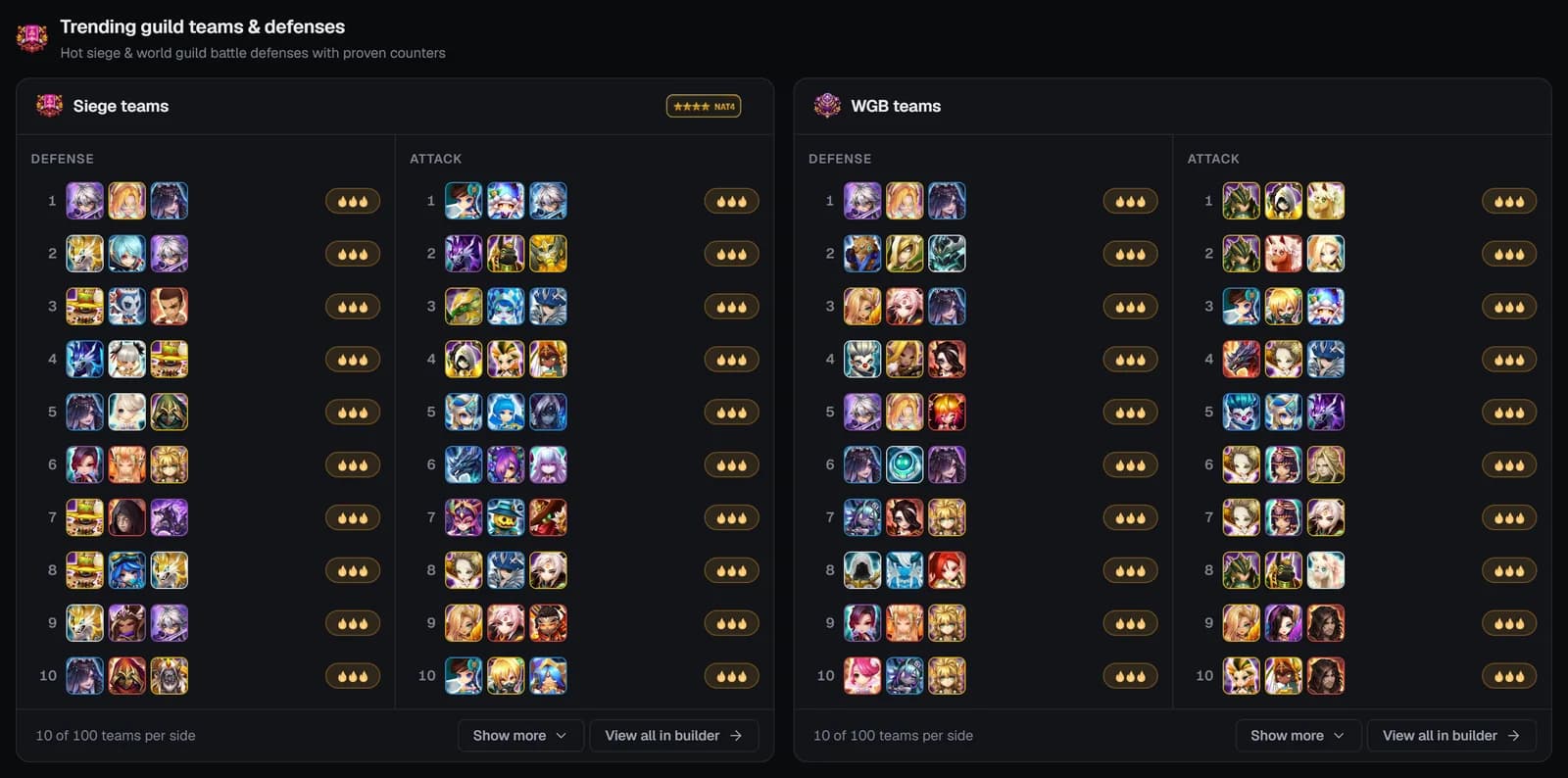
Trending guild teams & defenses
“Hot siege & world guild battle defenses with proven counters.” The Siege teams and WGB teams cards each have a Defense column and an Attack column of three-monster teams:
- Defenses list the meta teams from the weekly defense meta import first, then SWLens trending teams, then community teams by usage.
- The Siege card’s NAT4 button shows only teams of natural 4★ and lower monsters.
- View all in builder opens the Siege or WGB Builder (a subscription is needed; otherwise a “Subscription Required” window lists the plans).
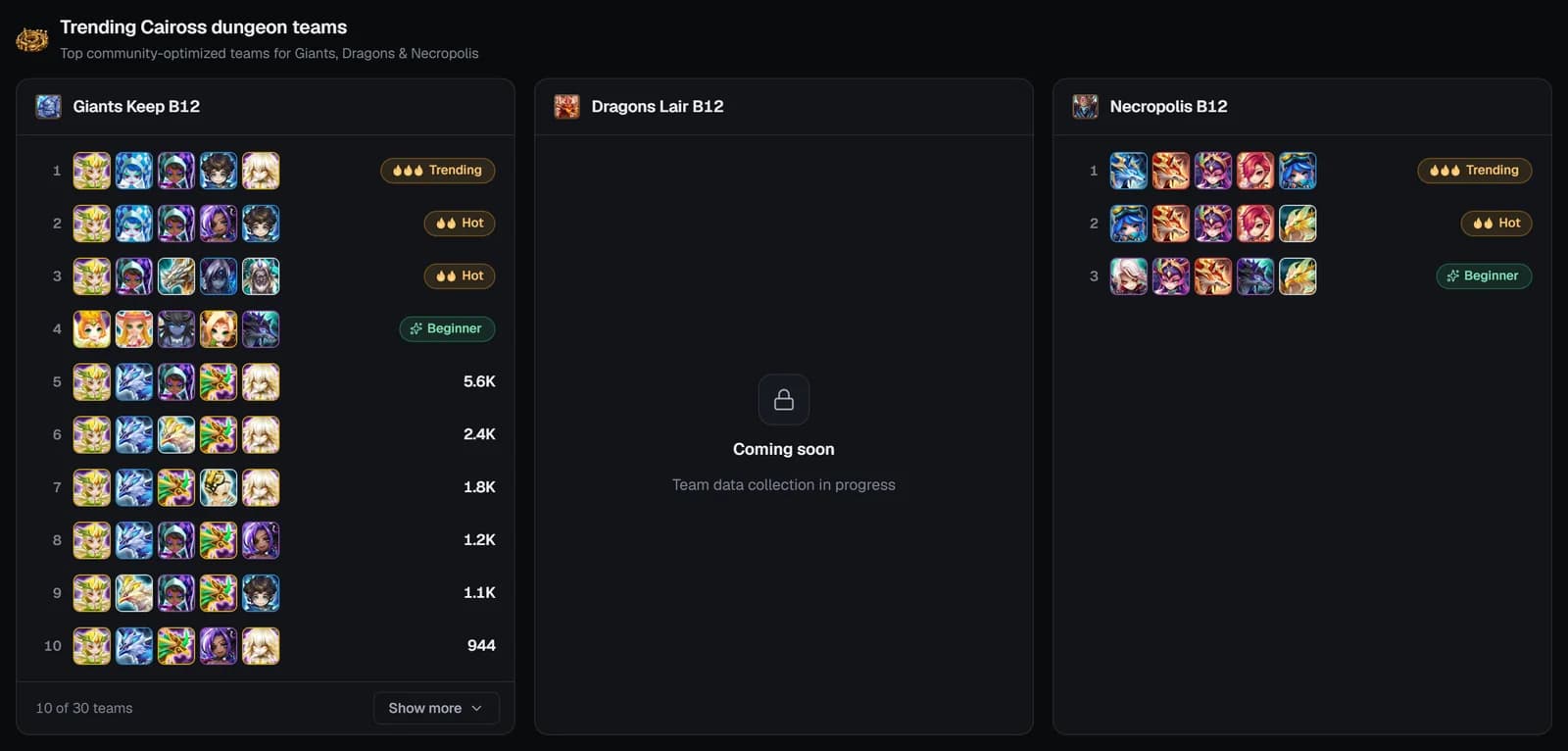
Trending Caiross dungeon teams
“Top community-optimized teams for Giants, Dragons & Necropolis” in three cards — Giants Keep B12, Dragons Lair B12 (coming soon) and Necropolis B12. Each lists trending teams, then community teams built on a known working turn order, plus a Beginner team (“Beginner friendly”). Badges read Trending / Hot / Warming up, or show the usage count. To optimise one of these teams for your runes, use the Caiross Workshop.
The All monsters tab
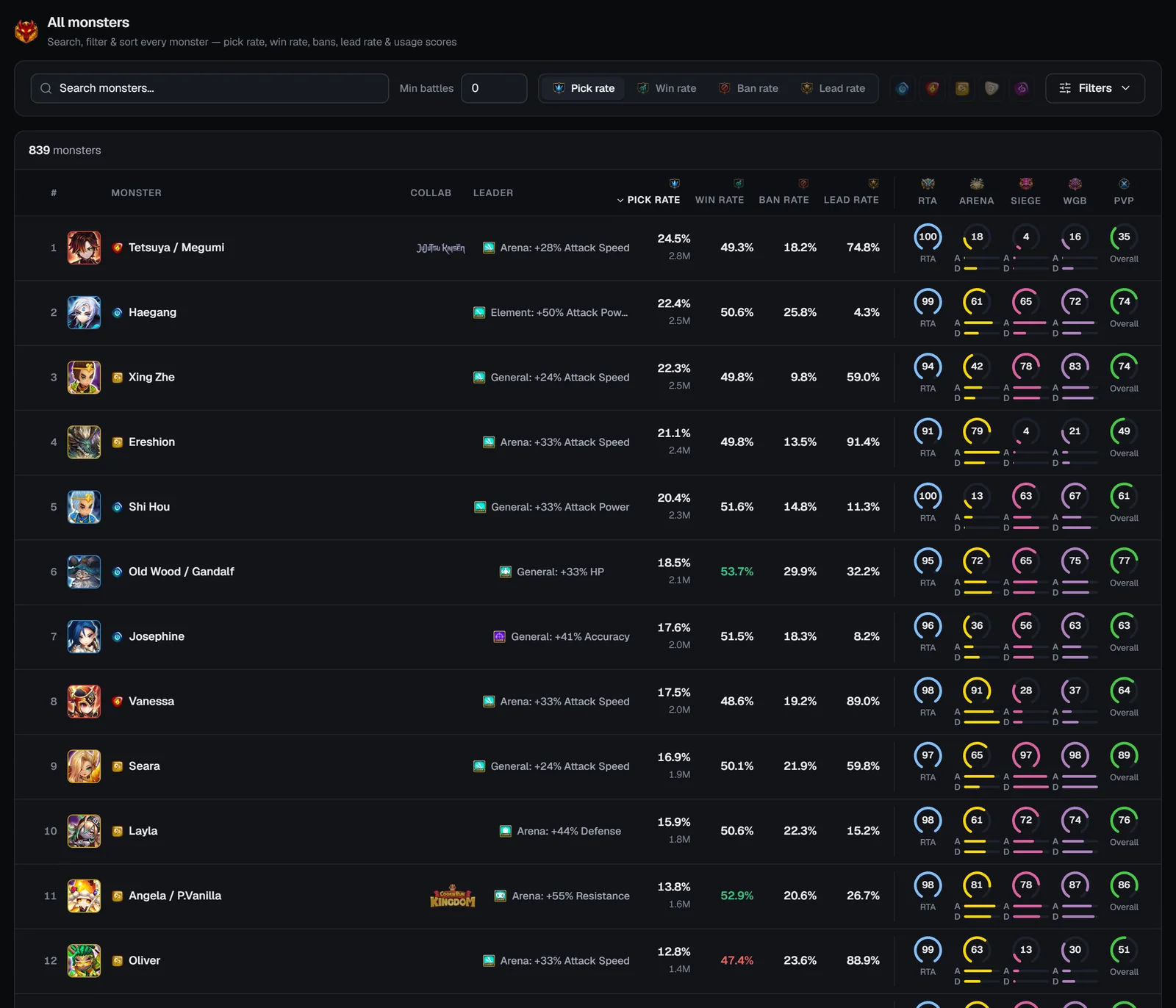
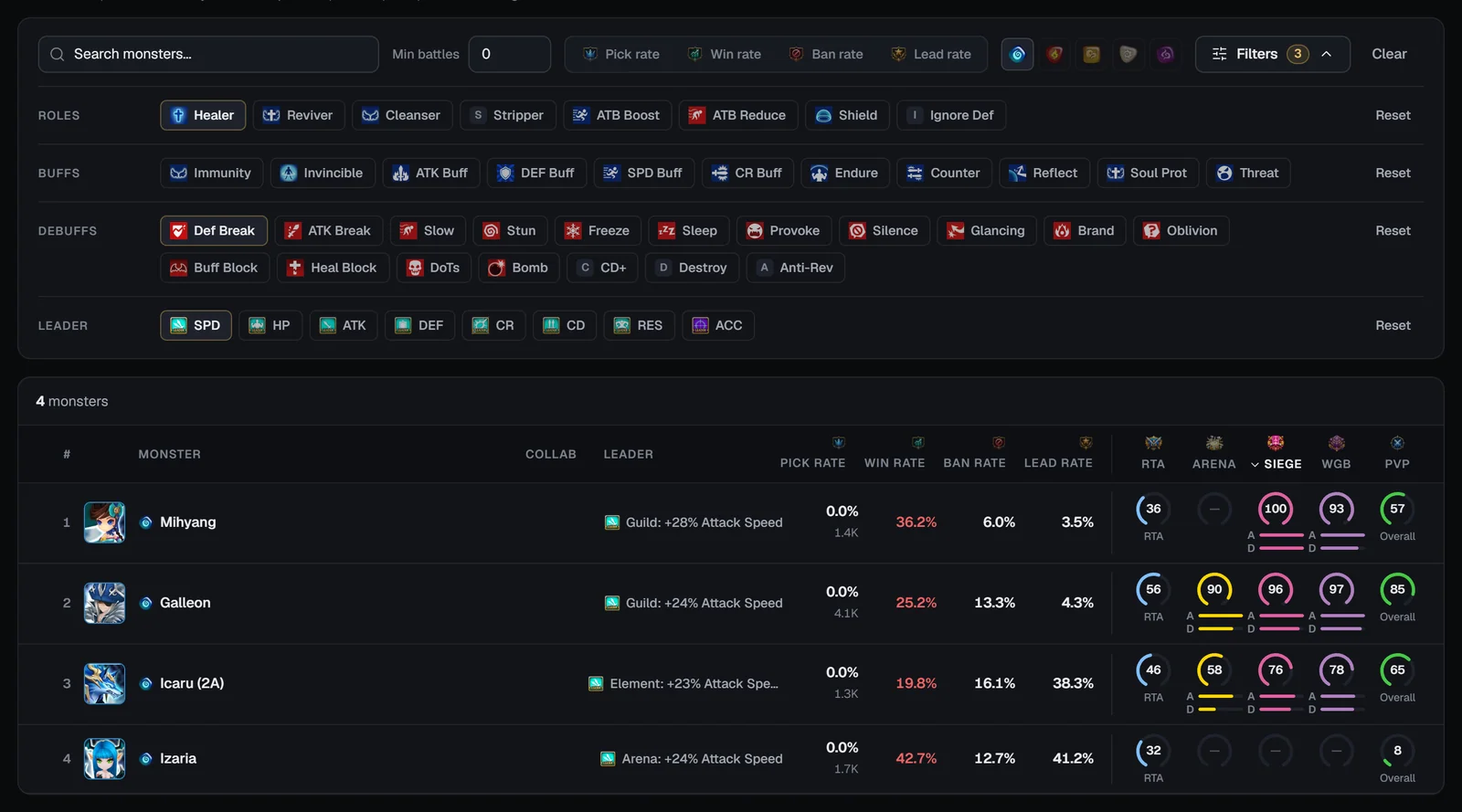
“Search, filter & sort every monster — pick rate, win rate, bans, lead rate & usage scores.” Open it with the tab, the Full table button, or /webapp/bestiary?tab=all. It lists every monster seen in ranked RTA across all recorded seasons (collab versions are merged into the original).
Controls
Columns
The table shows 50 monsters per page with Previous / Next; click a row to open the monster page.
How the numbers work
Monster pages
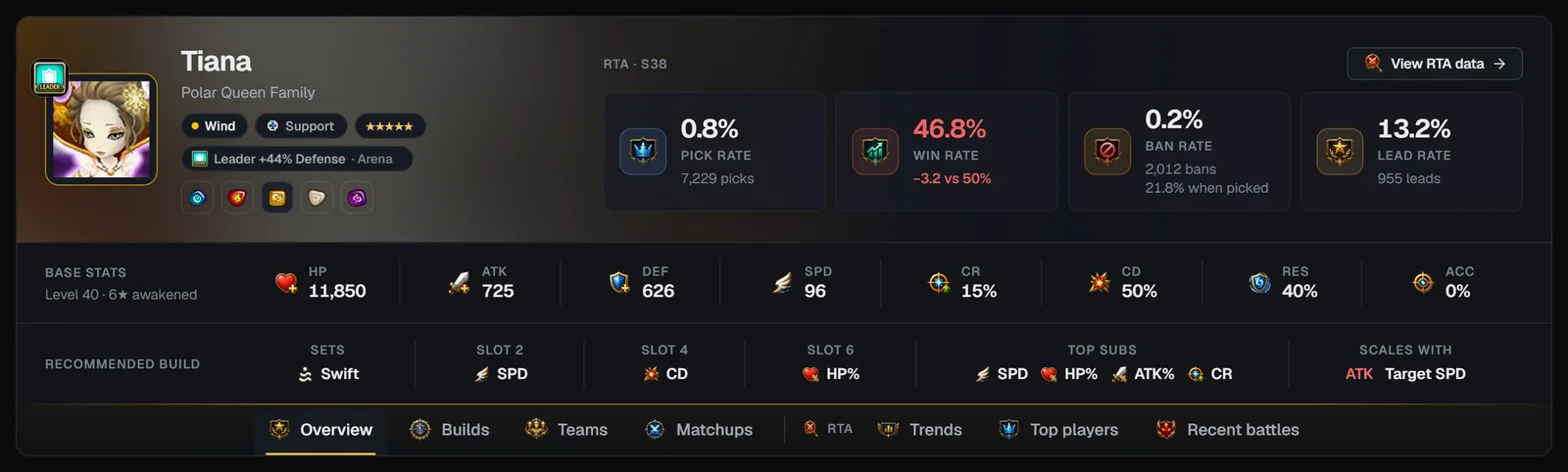
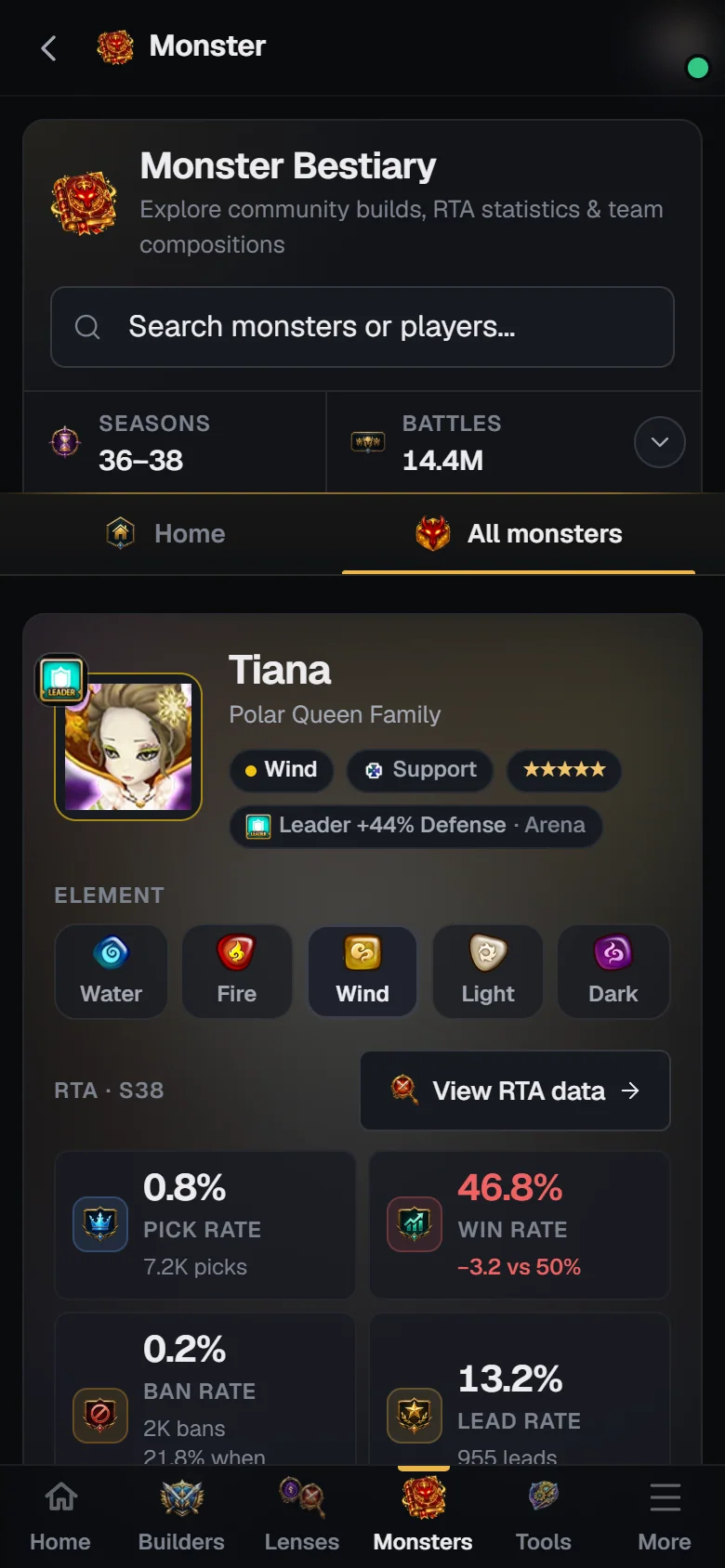
Every monster has its own page at /webapp/monster/<id>-<name> — for example Tiana (Wind Polar Queen). Monster pages keep the Bestiary header on top, so you can search again or switch to All monsters at any time.
The header
- Identity — portrait (framed in the element colour, with the leader skill icon), name, “Family” line and a collab logo where relevant.
- Badges — element, role (Attack, Defense, HP or Support), natural stars (orange for second-awakened monsters) and the leader skill (“Leader +N% stat · area”).
- Element switcher — five buttons that open the same family in another element (its 2A version when there is one), keeping your tab.
- RTA block — “RTA · S38” (the season) and a View RTA data button that opens the Trends tab.
The tiles follow the Season picked on the Matchups tab. Below them sit the Base stats band (“Level 40 · 6★ awakened”: HP, ATK, DEF, SPD, CR, CD, RES, ACC) and the Recommended build band: the top rune sets, the top slot 2 / 4 / 6 main stats, the top four substats, and Scales with — the stats its skills’ damage scales on.
The tabs
Seven tabs sit on the header’s bottom edge; the last three are grouped under RTA. Each tab has its own address (?tab=…), so you can share or bookmark it, and once you scroll down a compact bar with the portrait and the tabs stays pinned under the top bar.
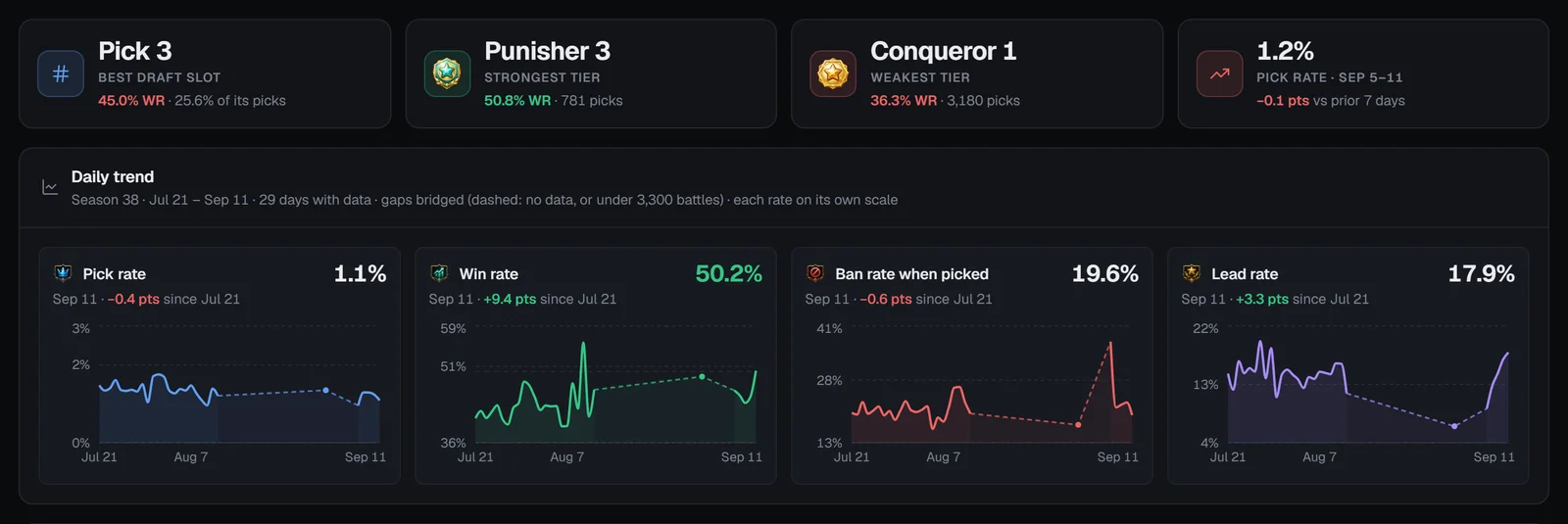
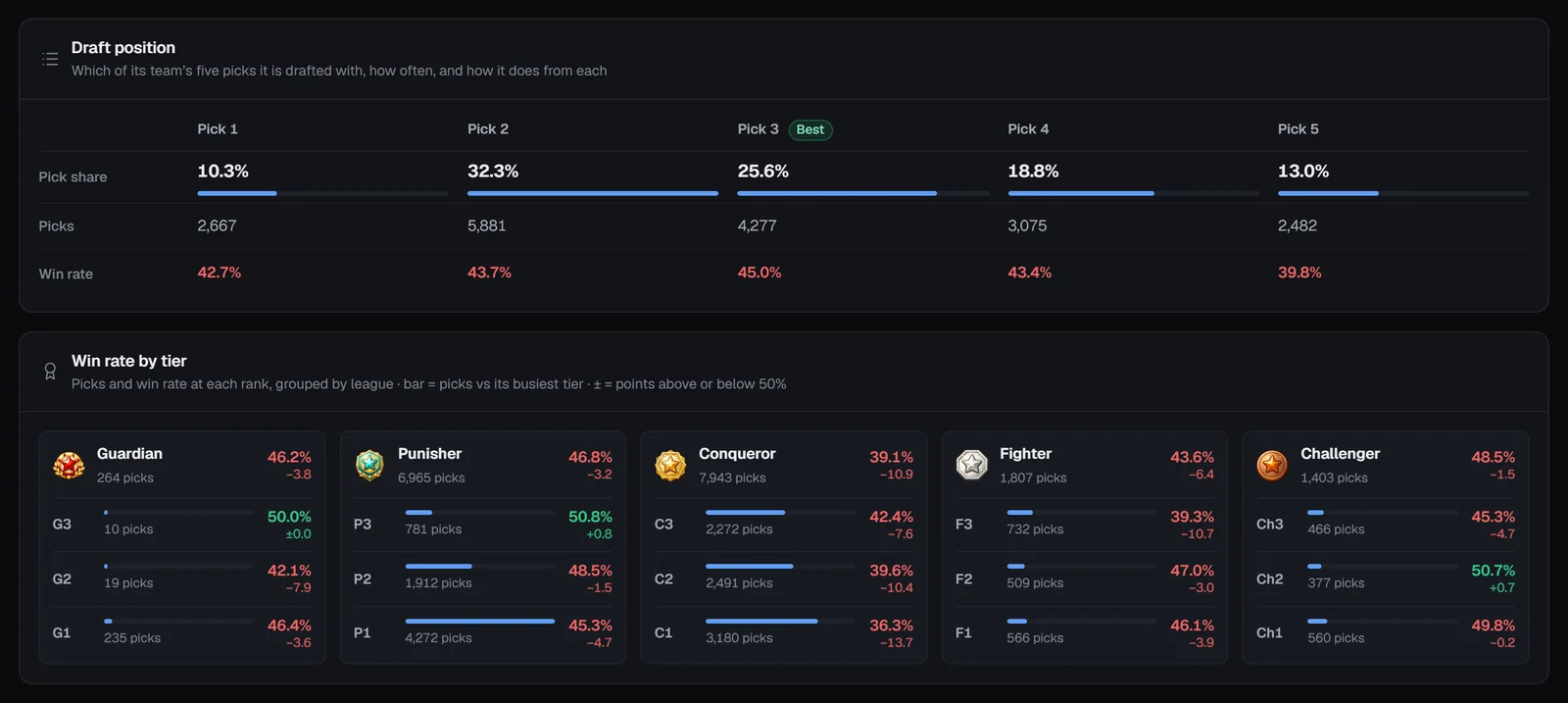
(default)Where the monster shines (usage scores), its skills and an About summary.?tab=buildsRTA and Siege rune sets, slot 2/4/6 main stats, top substats, artifacts and relics.?tab=teamsRTA synergy partners and the most-used RTA, Siege, WGB, Arena and Cairos dungeon teams.?tab=matchupsCounters, advantages, nightmare combos, best partners and best trios.?tab=trendsRTA draft position, daily pick / win / ban / lead trends and win rate by rank tier.?tab=top-playersThe highest-ranked RTA players who use the monster, with their teams.?tab=battlesThe latest ranked RTA battles with the monster, with filters.Overview tab
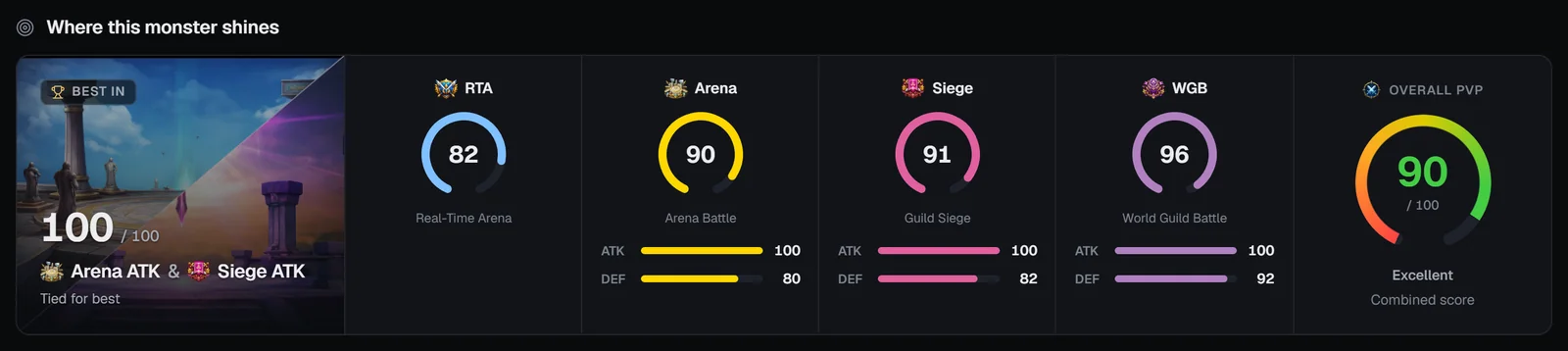
Where this monster shines
- Best in — the content where it scores highest, e.g. “Siege DEF · 72 / 100” (or the group when attack and defense are close, and “Tied for best” on a tie).
- RTA, Arena, Siege and WGB gauges from 0 to 100; Arena, Siege and WGB add attack and defense bars.
- Overall PvP — a combined score with its label, from Poor to Excellent.
Skills
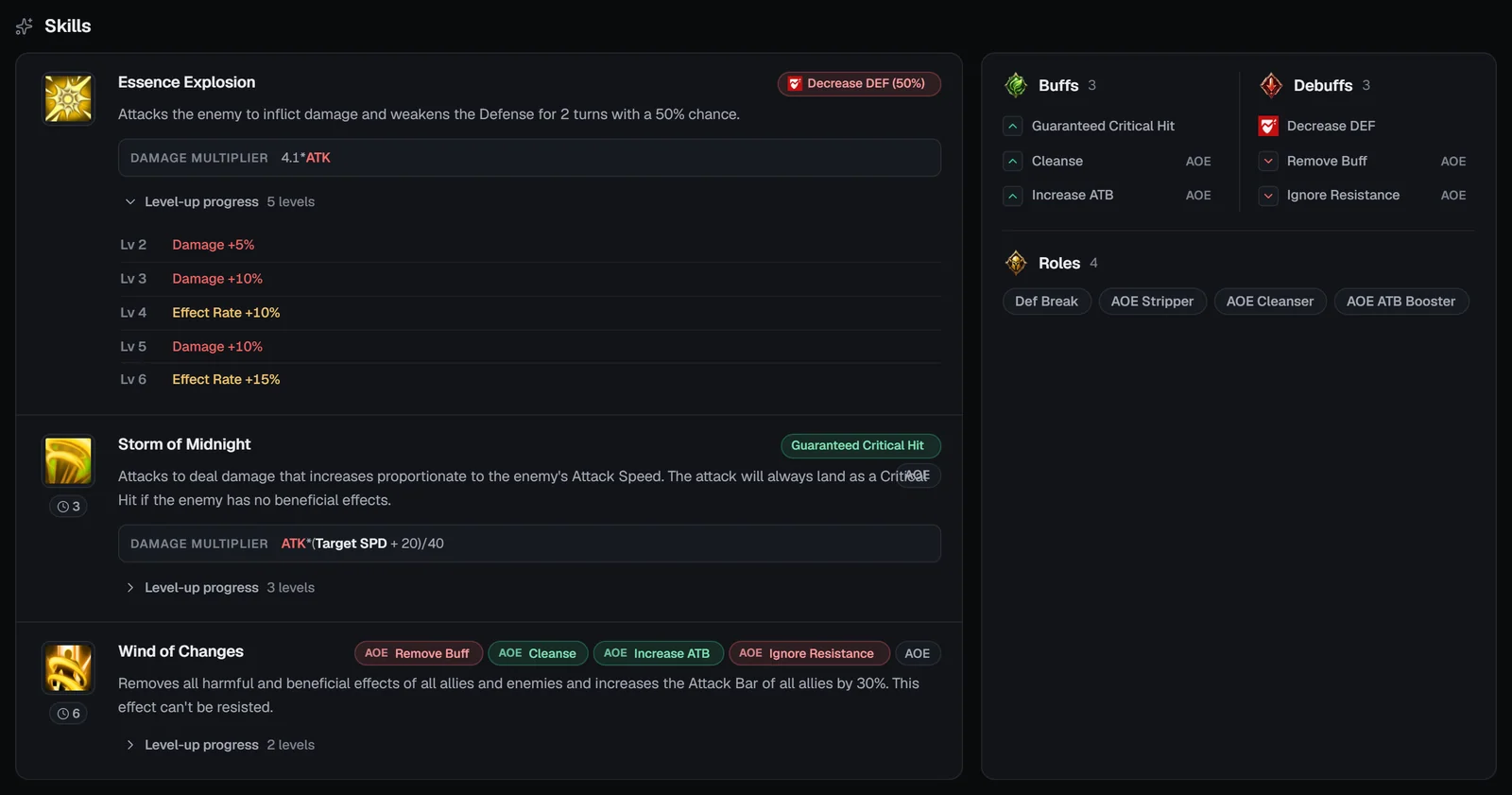
One row per skill:
- icon, name, a cooldown badge (“Cooldown: N turns”), and Passive / AOE badges;
- effect pills — buffs in green, debuffs in red, with the chance when below 100% and an AOE mark;
- the description and the Damage multiplier formula with its stat tokens (ATK, DEF, MAX HP, SPD…);
- Level-up progress — open it to see every skill-up (damage, effect rate, cooldown, recovery).
Beside the skills, a card totals the Buffs, Debuffs and Roles (Stripper, Cleanser, Immunity, ATB Booster, ATB Reducer, CC, Healer, Reviver, Def Break, Atk Break, Branding, Buff Block — “AOE” when it hits every target).
About
A written summary of the monster: its stars and role, its top RTA build, where it is used, its best partners, the monsters it beats and the ones that counter it — with clickable monster names.
Builds tab
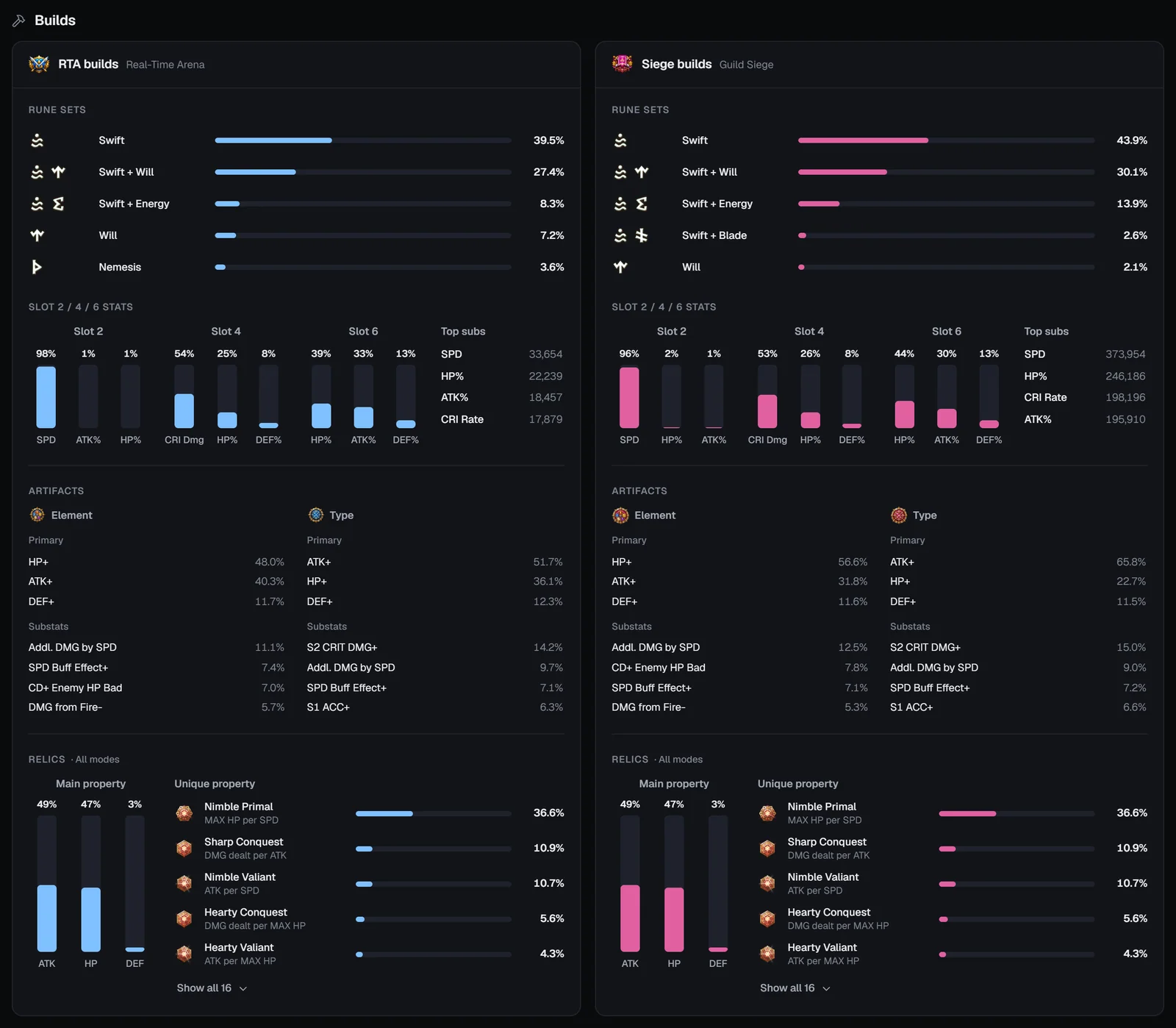
Two cards side by side: RTA builds (Real-Time Arena) and Siege builds (Guild Siege). Each card has:
Teams tab
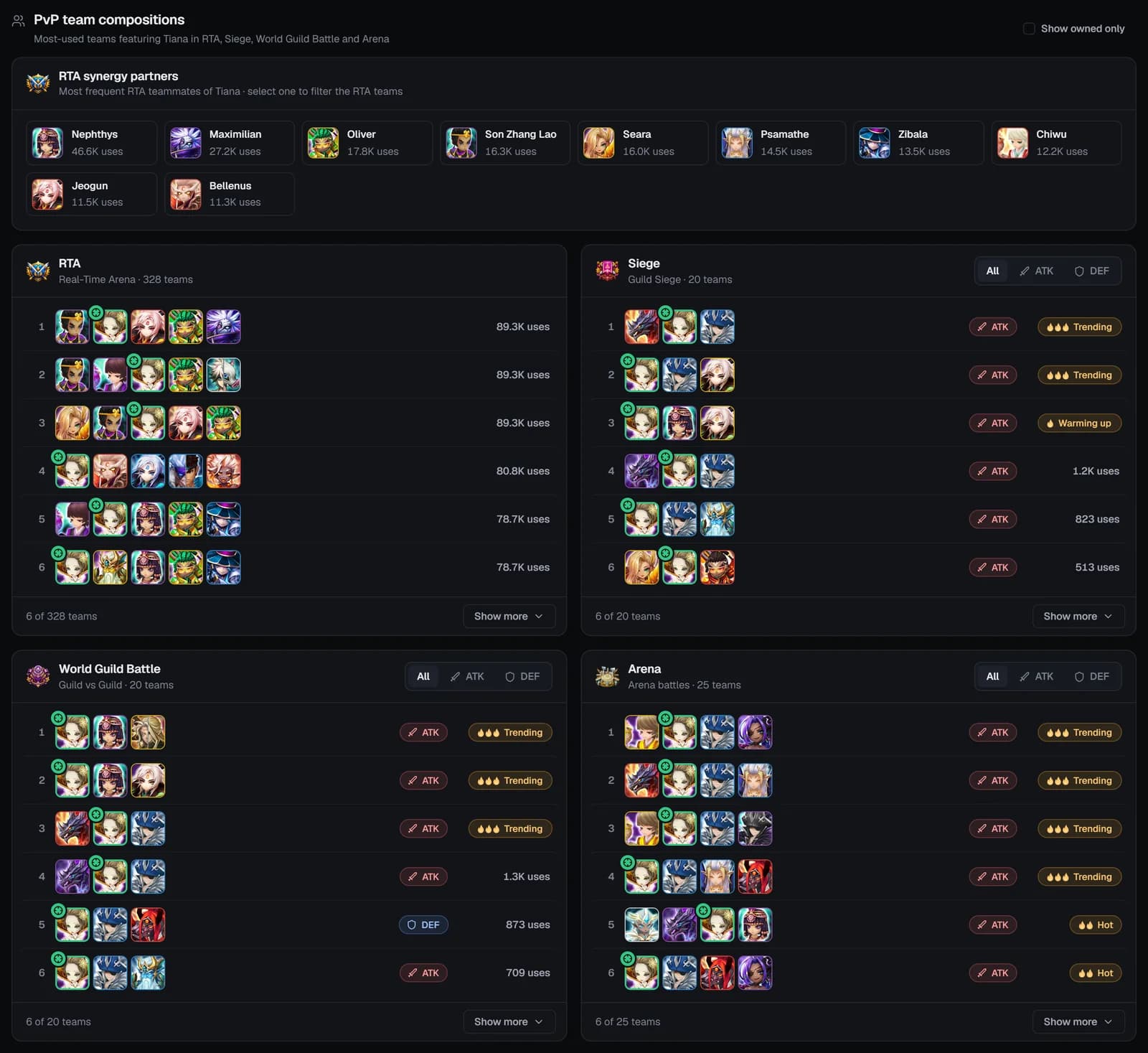
PvP team compositions
- RTA synergy partners — the ten teammates it is drafted with most (“N uses”). Click one to filter the RTA teams to those with both monsters; Clear filter resets it.
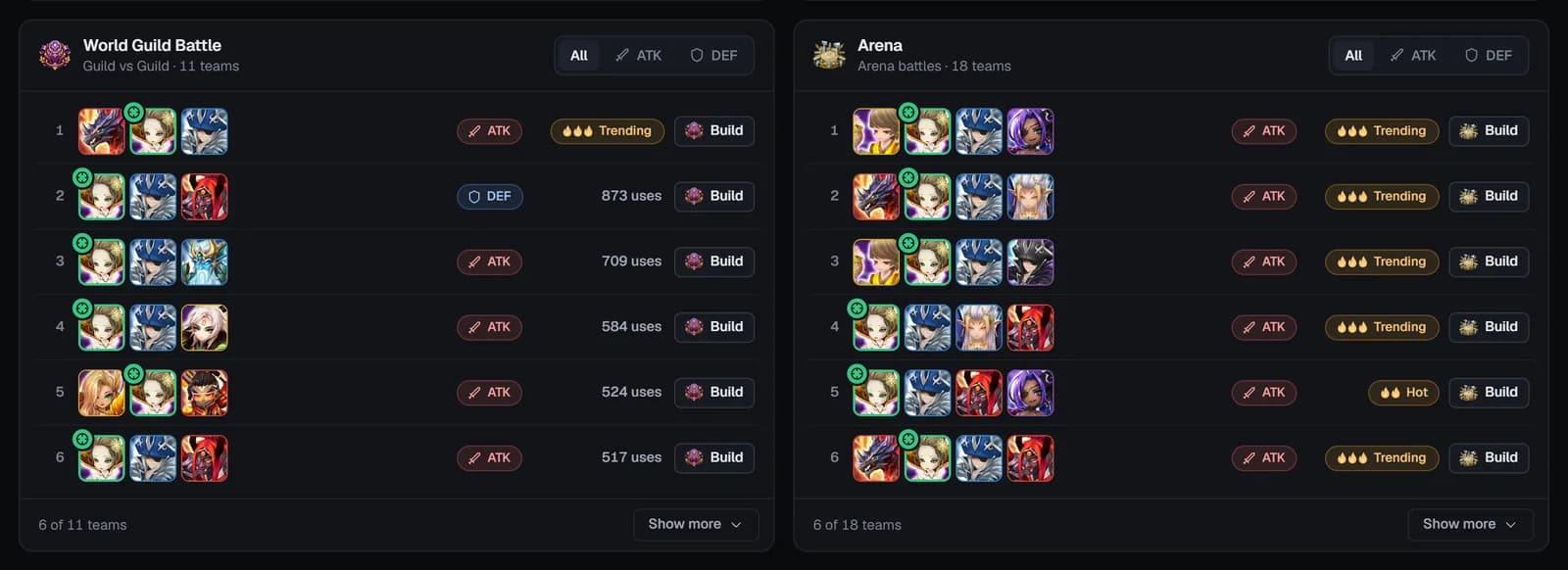
- Four mode cards — RTA, Siege, World Guild Battle and Arena — list the most-used teams with the monster. Siege, WGB and Arena have an All / ATK / DEF switch.
- Each row shows the team (the page’s own monster framed in green), an attack (sword) or defense (shield) badge, and either “N uses”, a trending flame badge or “Beginner”. Lists open at 6 rows; Show more adds 10.
- Show owned only keeps only teams you can field from your imported box (and reveals the Build buttons — see below).
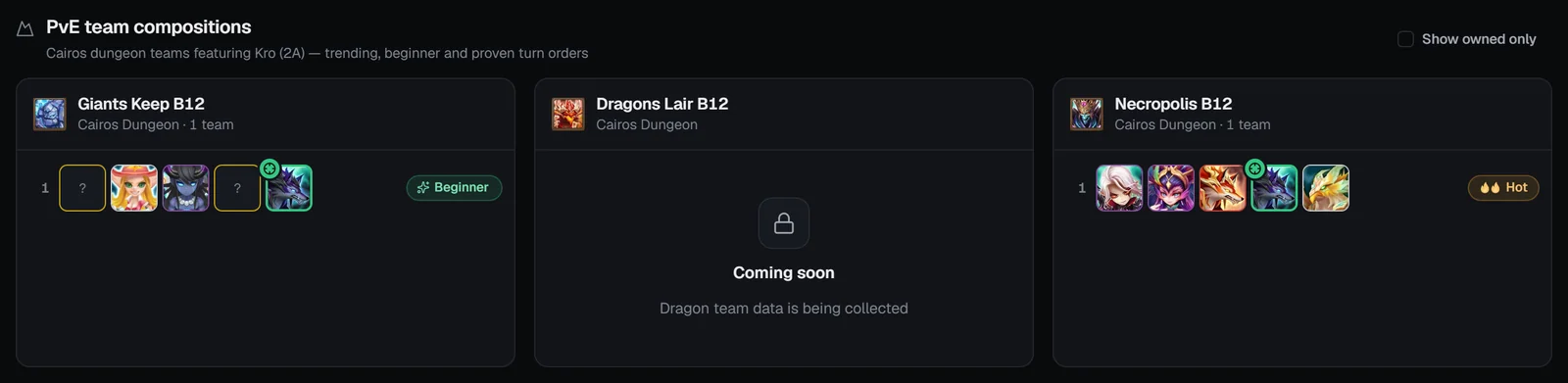
PvE team compositions
Cairos dungeon teams with the monster — Giants Keep B12, Dragons Lair B12 (coming soon) and Necropolis B12 — trending teams, the beginner team and proven turn orders. Try Kro (2A), who is in both beginner teams.
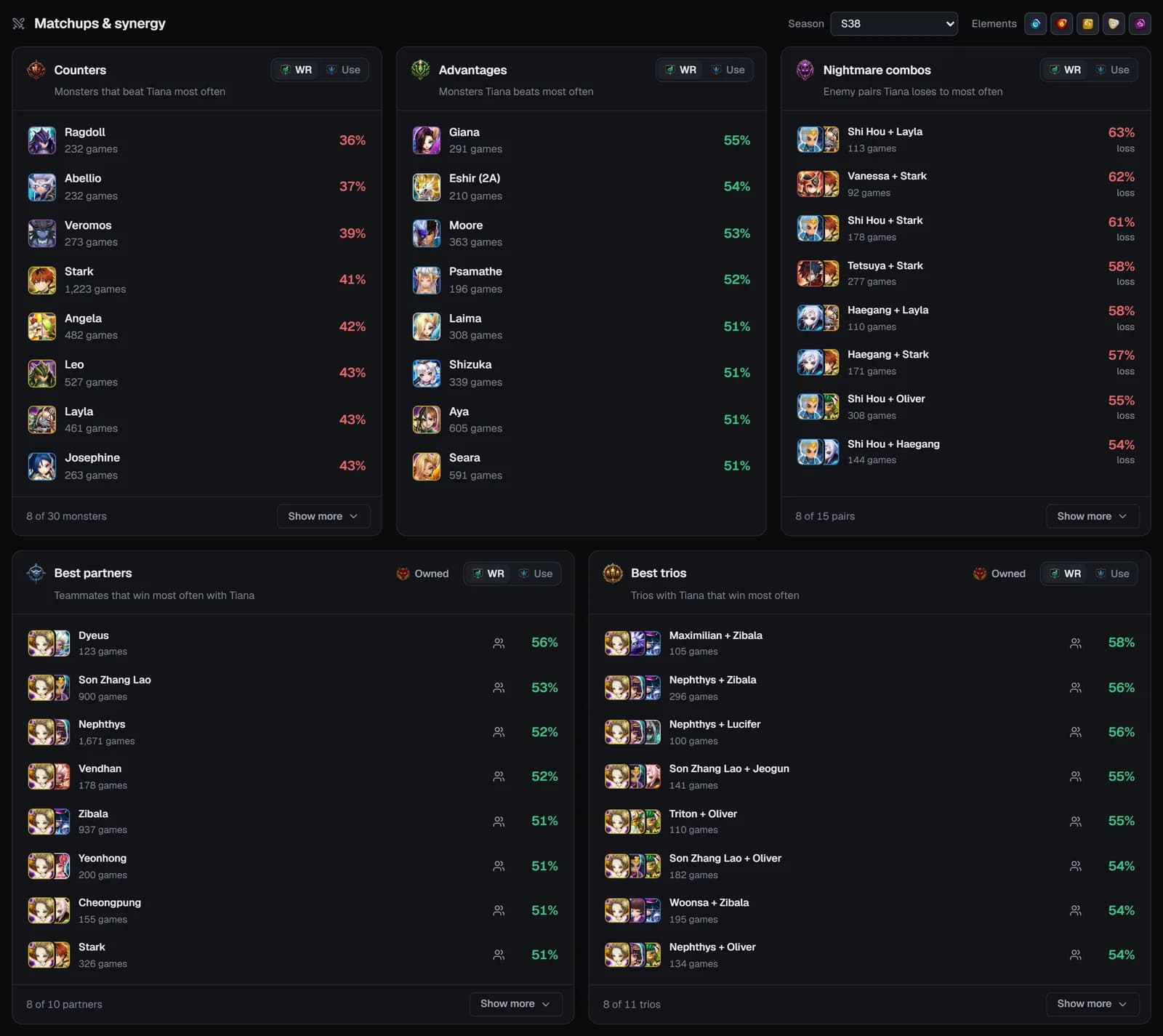
Matchups tab
“Matchups & synergy” from ranked RTA battles at Punisher level and above (at least 3 games per pairing). Two filters apply to all five cards:
- Season — the live and previous season, “Since 10 Feb patch”, “S36 Pre-BP” or “All Seasons”. It also sets the header’s RTA tiles.
- Elements — hide opponents and partners of an element (at least one stays on).
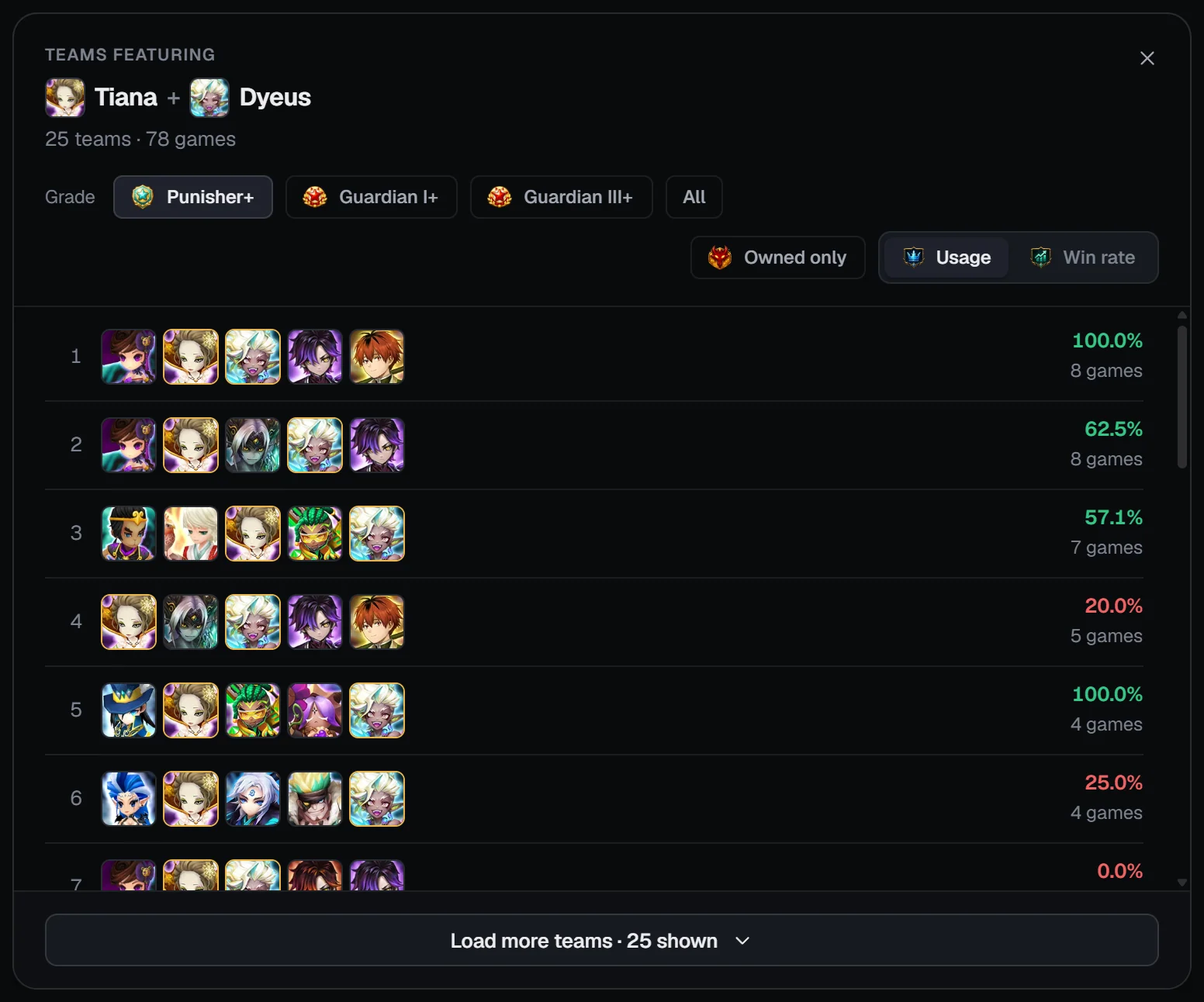
Each card sorts by WR (default) or Use, opens at 8 rows with Show more, and every monster opens its own page. With your JSON imported, Best partners and Best trios get an Owned toggle. The View teams button on a partner or trio opens the full teams that contain them, filterable by grade (Punisher+, Guardian I+, Guardian III+, All), owned only and usage or win rate.
Trends tab (RTA)
The RTA tabs use the site’s default season.
Top players tab (RTA)
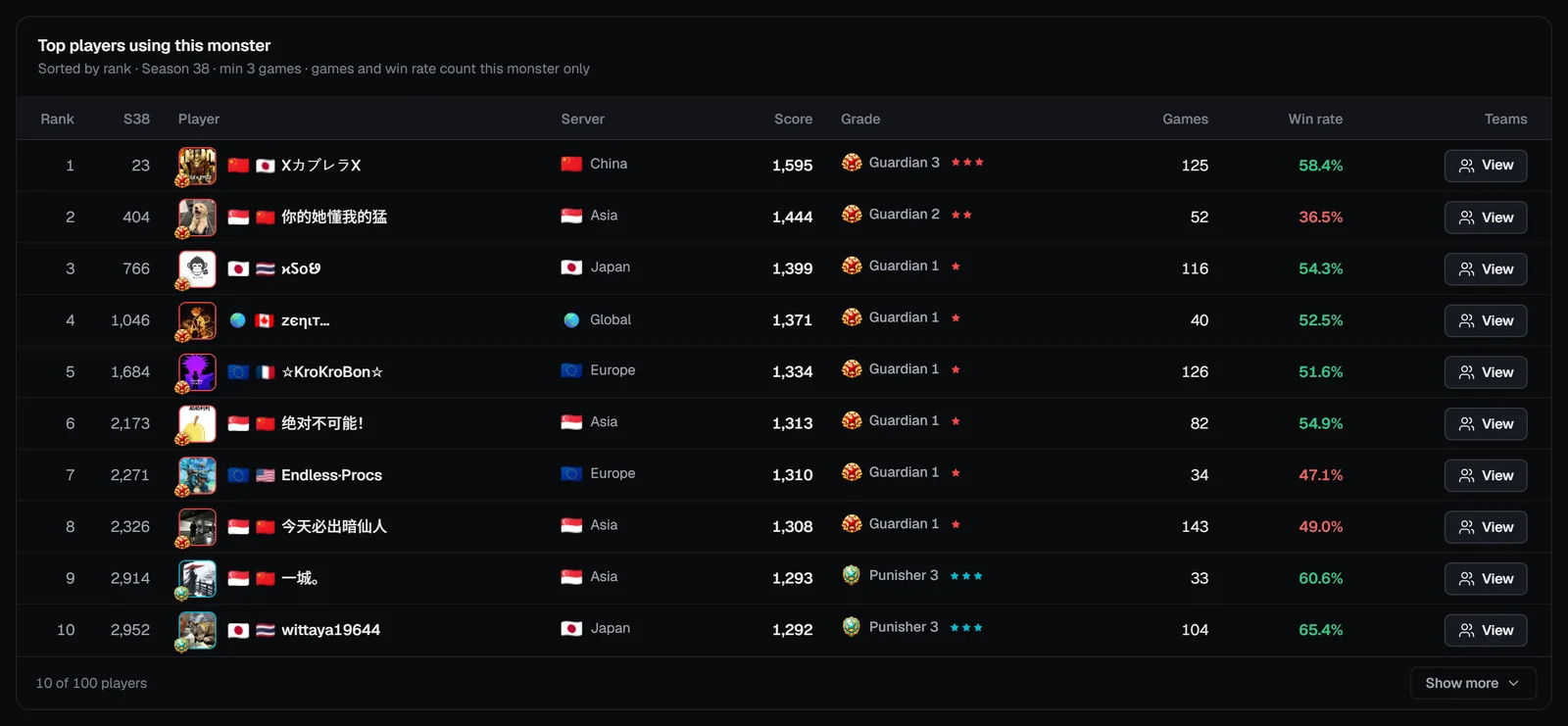
“Top players using this monster” — sorted by rank, at least 3 games this season, with games and win rate counted for this monster only. Columns: list rank, season leaderboard rank, player (opens their RTA profile), server, score, grade, games, win rate and Teams → View, which shows the teams that player runs it in.
Recent battles tab (RTA)
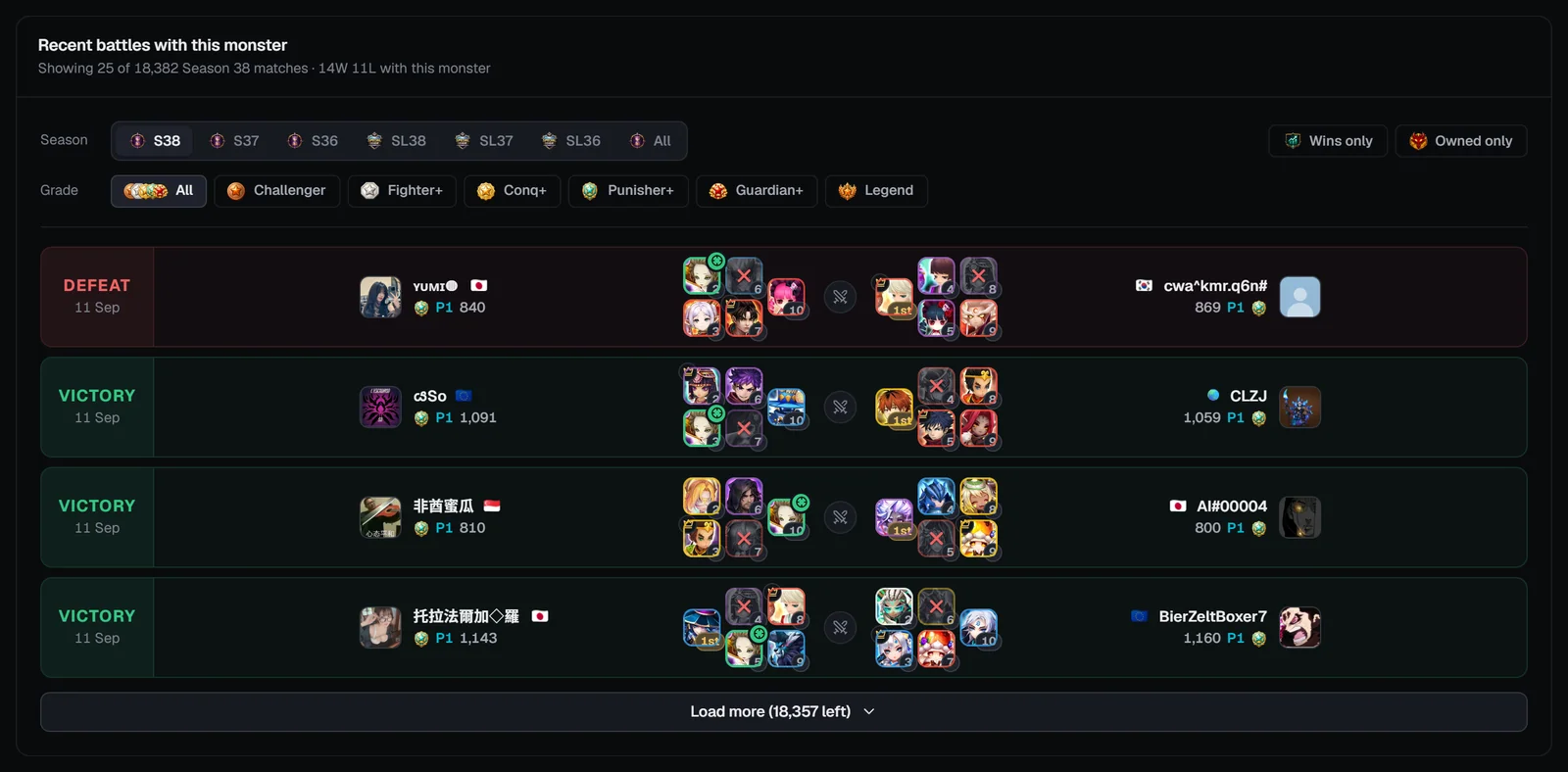
- Season chips: the last three seasons, each Special League (SL38 …) and All.
- Wins only — battles its team won. Owned only — battles where you own the whole team (needs your JSON).
- Grade: All, Challenger, Fighter+, Conq+, Punisher+, Guardian+ or Legend (either player).
Each row shows Victory or Defeat from the side that drafted the monster, both players with their rank and score, and both drafts in pick order (“1st”, the leader’s crown, the banned pick greyed with ✕, and a crosshair on this monster). Load more adds 25.
From a monster to the builders
- Log in and import your SWEX JSON (how).
- Open a monster’s Teams tab and switch on Show owned only.
- Click Build on a team, e.g. “Build this team in Siege Builder (DEF mode)”. SWLens prepares the team with the versions you own and opens the builder:
RTA Builder
From RTA teams. Guide →
Siege Builder
From Siege teams (attack or defense). Guide →
WGB Builder
From World Guild Battle teams. Guide →
Arena Builder
From Arena teams. Guide →
Caiross Workshop
From Giants B12 teams (opens on the Build step). Guide →
The builders need the matching plan: Premium, or Basic with that builder chosen (Arena is in every paid plan; the Caiross Workshop is Premium only). Without it, a “Subscription Required” window lists the options.
On phones
- The header’s stats fold into one line (tap to open) and the tabs stay pinned as you scroll.
- Home starts with jump chips — RTA meta, RTA & Arena, Siege & WGB, Dungeons.
- The RTA meta filters open from one “Filters” row (e.g. “S38 · All ranks · All elements”) as a sheet with Reset and Done.
- All monsters becomes cards with sort chips, a Filters sheet and “Load more”.
- Monster pages keep all seven tabs in a sticky strip; the element switcher shows labelled buttons; dialogs open full screen.
Frequently asked questions
Is the SWLens Bestiary free?
Yes. The Bestiary and every monster page are public: no account, login or SWEX JSON needed. Logging in and importing your JSON only adds “owned” filters and the Build buttons that send a team to a builder.
Where do the Bestiary numbers come from?
RTA pick, win, ban and lead rates come from real ranked Real-Time Arena battles that SWLens records. Builds come from the rune sets, main stats and artifacts players use; teams come from community data and the teams SWLens users optimise; Siege and WGB defense lists also use the weekly defense meta import.
How do I find a monster?
Type at least two letters in the search box at the top of the Bestiary: it matches monster names and family names (so “Ifrit” finds every Ifrit), skips dots and spaces, and knows collab names. Or open the All monsters tab to sort and filter every monster.
What is the usage score?
A 0–100 score per content (RTA, Arena, Siege, WGB) showing how often a monster appears in that content’s teams compared with every other monster, with a small boost for monsters in trending teams. Arena, Siege and WGB average their attack and defense scores; the Overall PvP score combines all four.
What does “Best overall” mean in the RTA meta lists?
It ranks monsters by win rate weighted by how many games they played (the lower bound of a Wilson score interval), so a monster with a high win rate over thousands of games ranks above one with a lucky handful.
What do the flames on teams mean?
Flames mark SWLens trending teams, ranked by how often SWLens users optimise them in the builders: the top 30% of a list get three flames (Trending), the next 35% two (Hot) and the rest one (Warming up).
How do I build a team I found in the Bestiary?
On a monster page, open the Teams tab, log in with your SWEX JSON imported and switch on “Show owned only”. Teams you can field get a Build button that opens the right builder (RTA, Siege, WGB, Arena or Caiross) with the team loaded. The builders need the matching subscription.
Where did the Summon log and My Monster Analytics go?
They moved to My Monsters, the section for your own account. Old Bestiary links to them open My Monsters automatically.
Is there a tier list?
Yes: the RTA Tier List has its own page in the sidebar, under Bestiary. It ranks monsters S+ to D per grade (Conqueror, Punisher, Guardian, G3) from draft presence and win rate.
Related guides


About the SWLens Summoners War Bestiary
The SWLens Bestiary is a free Summoners War monster list and database. Search any monster by name or family, browse the RTA meta — top picks, highest win rates, best overall and most banned, from single monsters to five-monster cores — and see the trending RTA, Arena, Siege, WGB and Cairos dungeon teams. Every monster page shows its skills, level-40 base stats, best rune builds, artifacts and relics, usage scores, team compositions, counters and synergies, RTA trends, top players and recent battles, all from real ranked battles and community data, with one-click hand-off to the SWLens team builders.
Look up your next monster
Search any monster for its builds, teams, matchups and live RTA stats — free, no login needed.
 RTA Lens guide