What Is Rune Lens?
Rune Lens evaluates every rune using the RL Score — a proprietary formula that considers substat quality, innate bonuses, and stat relevance to produce a single number that tells you whether a rune is worth keeping. It's the scoring engine behind the entire SWLens platform, used across all builders, the rune optimizer, re-app calculator, and more.
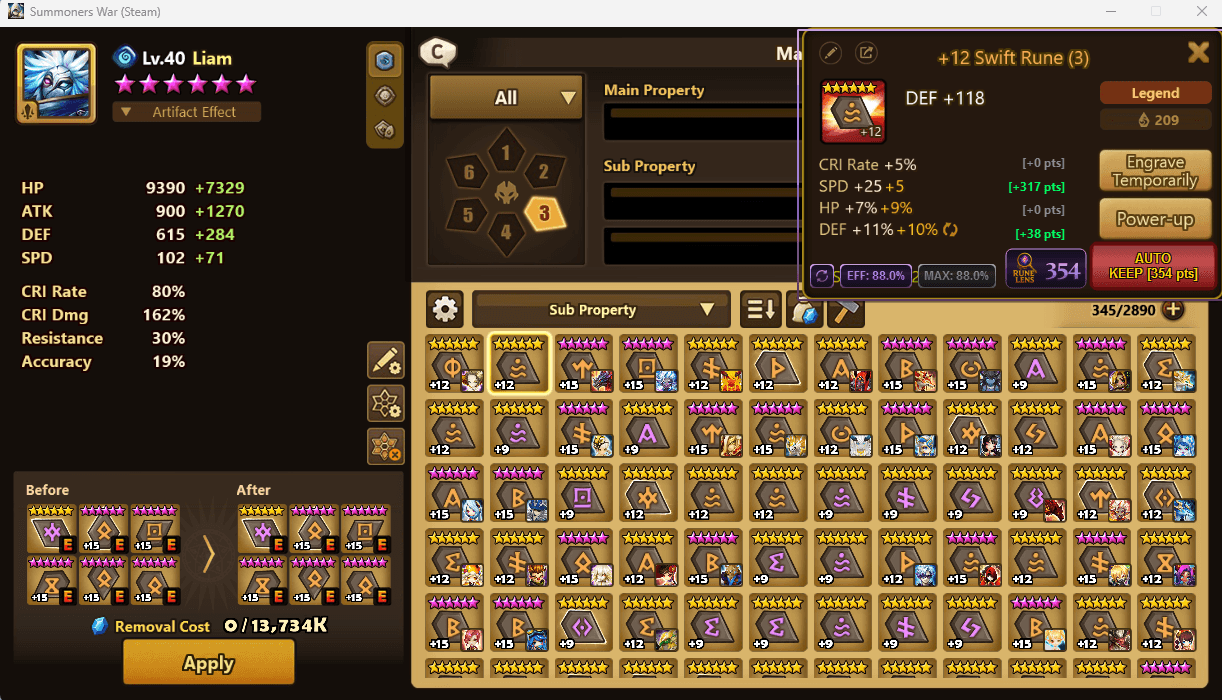
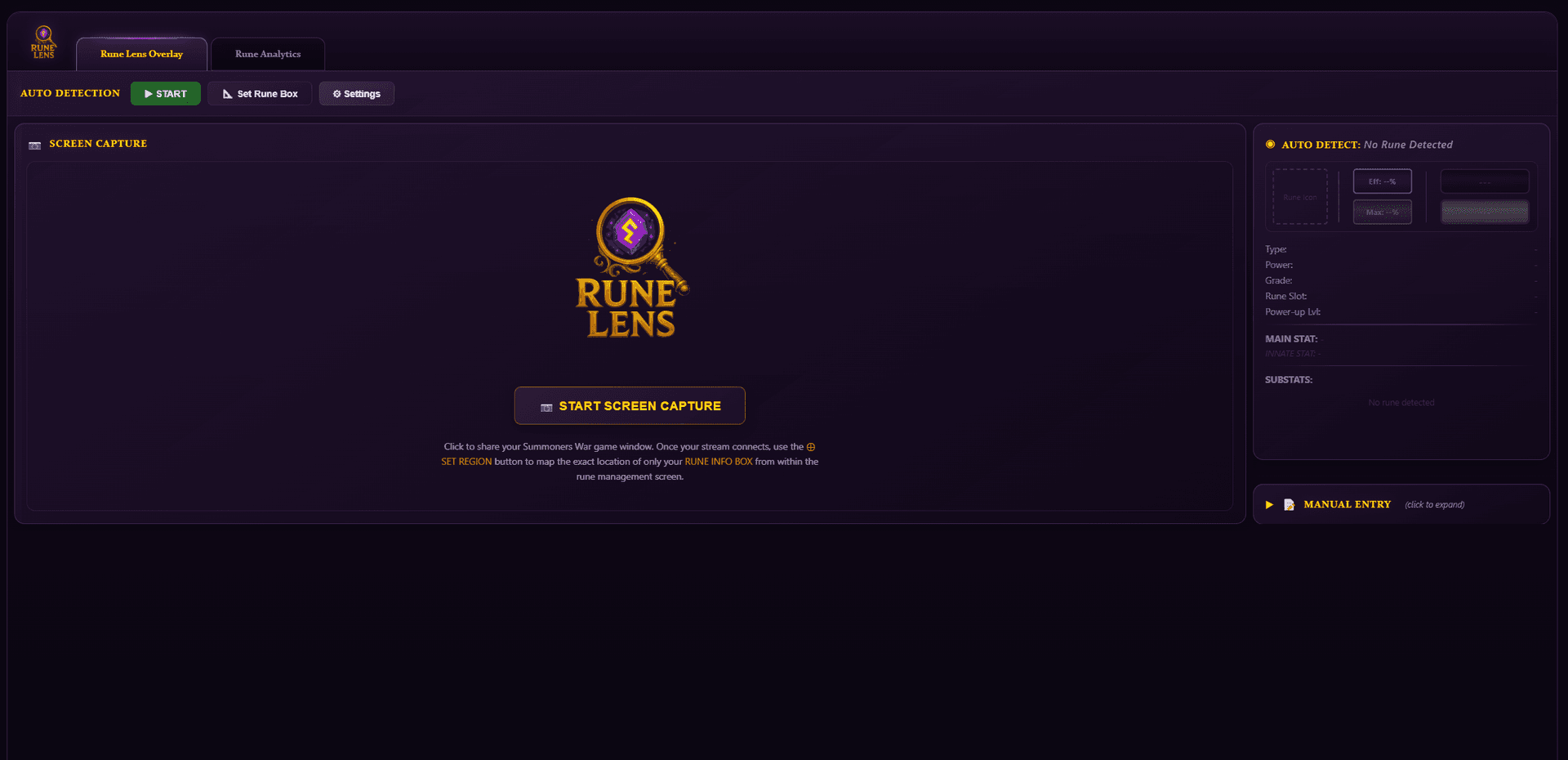
On the desktop app, Rune Lens runs as a transparent overlay directly on top of your game window. It reads rune data in real-time via OCR and displays instant sell/keep recommendations without alt-tabbing or manual input. On the web app, a lite version provides the same scoring engine with browser-based screen capture and a manual entry panel.
Desktop Overlay — Setup Guide
The desktop overlay is the star feature of SWLens and the only overlay tool in existence for Summoners War. Here's how to get it running in under a minute.
Getting Started
If Auto-Detect Doesn't Work
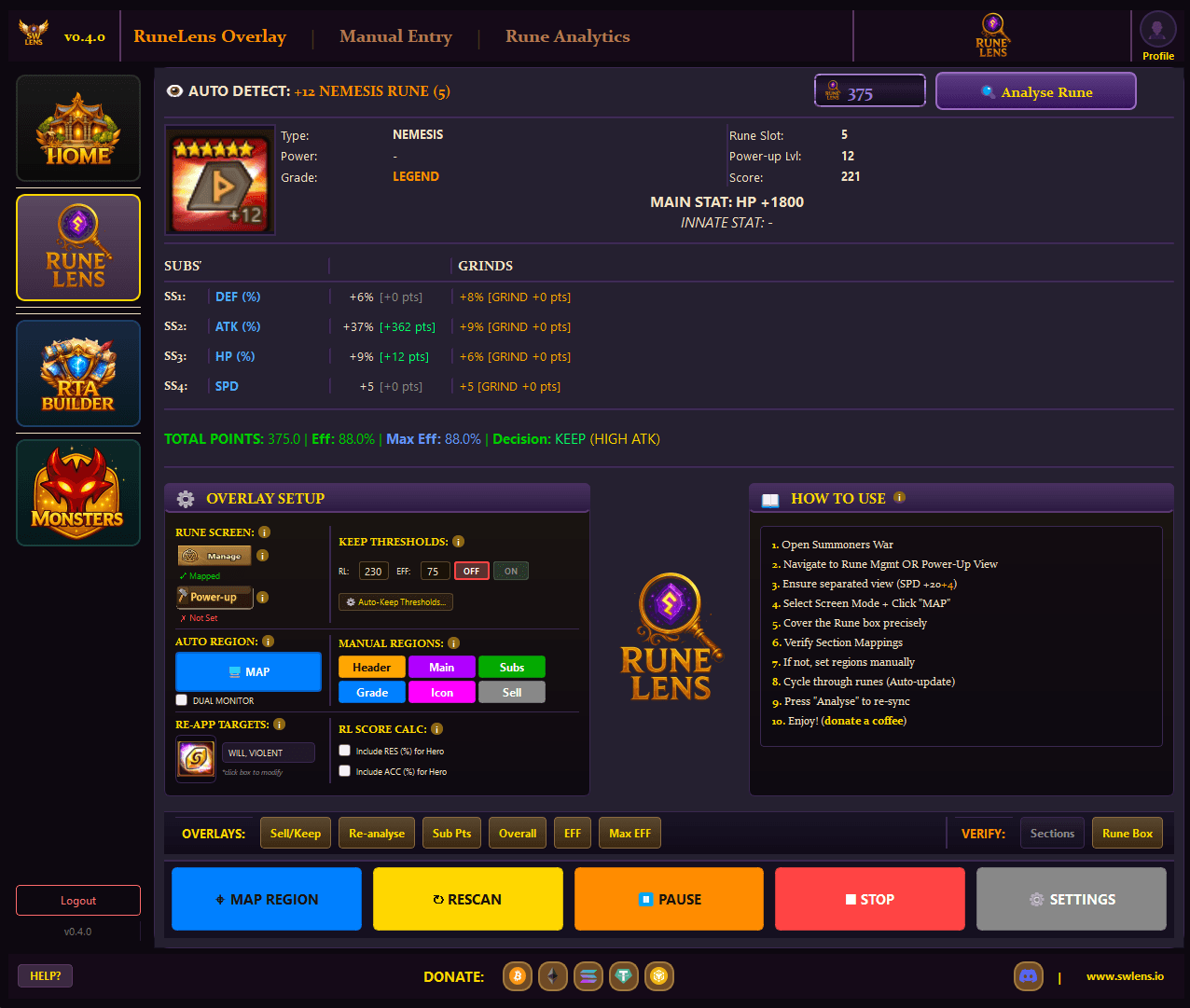
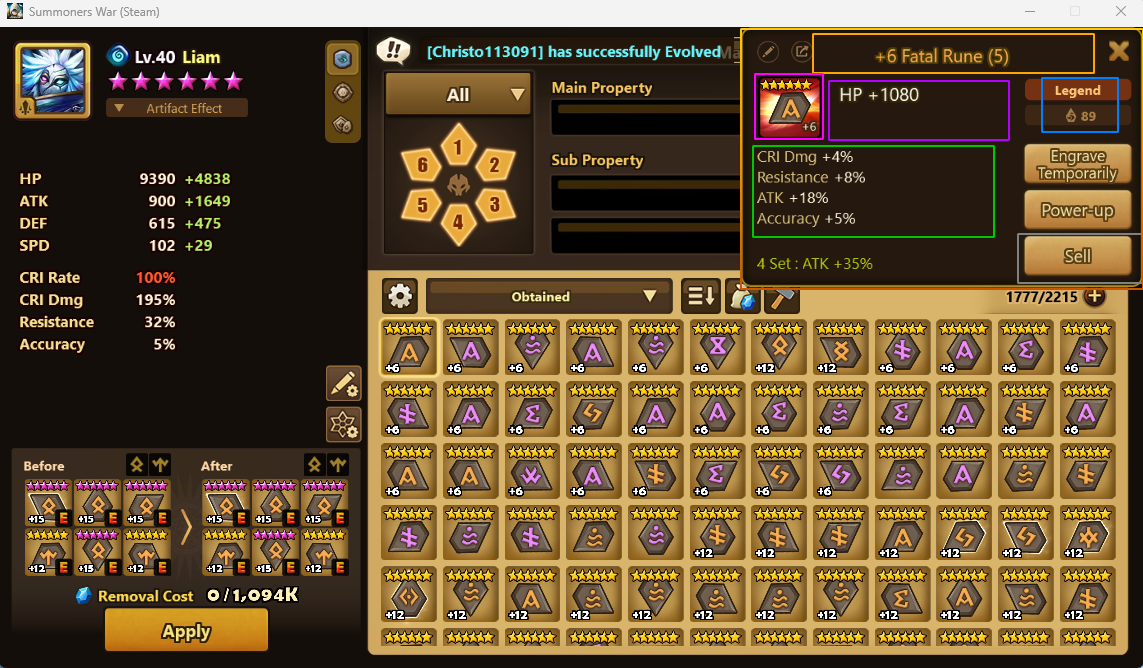
Auto-detect works on most setups, but if it fails (unusual resolutions, emulators, or edge cases), click MANUAL MAP in the control bar. This opens a full-screen selection tool where you draw bounding boxes for each region: header, main stat, substats, grade, sell button, rune icon, and the rune info box. Your manual mappings are saved locally and persist across sessions, so you only need to do this once.
The Control Bar
The desktop app has a control bar at the top with everything you need:
Screen Modes: Management & Power-Up
Summoners War has two screens where rune information is displayed, and Rune Lens supports both. The app automatically detects which screen you're on and switches between them as you navigate in-game.
Your rune inventory screen — where you browse and manage runes from the monster or rune list. The rune info panel appears on the right side of the screen.
Use for: Browsing inventory, equipping runes, reviewing rune stats
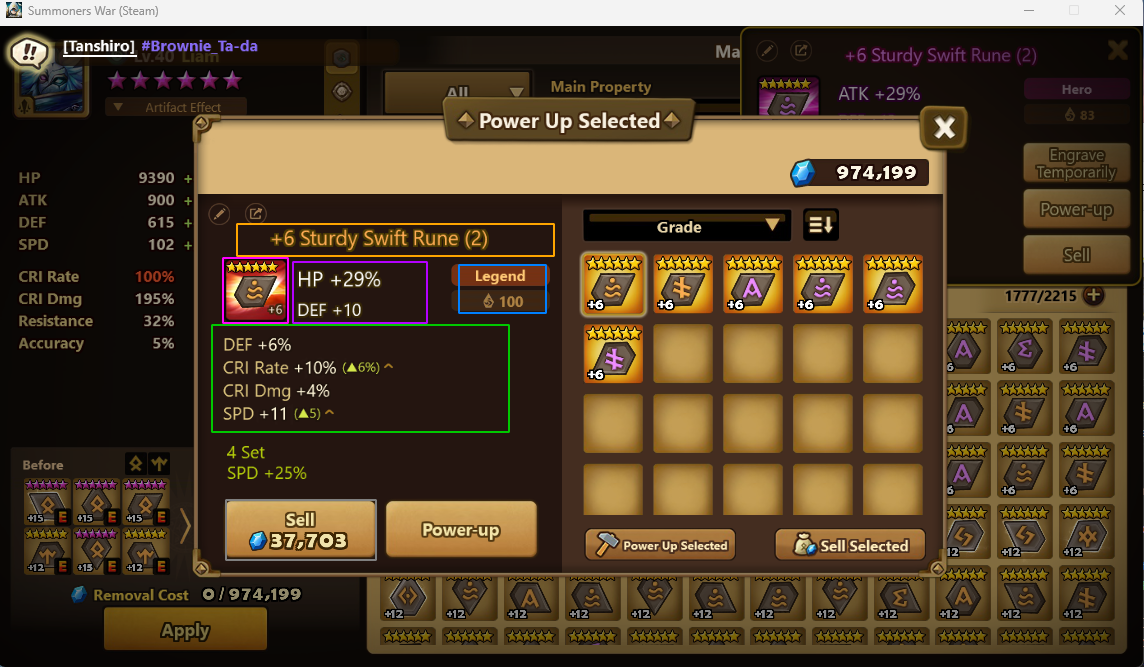
The rune enhancement screen — where you level up runes from +0 to +15. The rune info panel appears as a centered dialog.
Use for: Powering up runes, checking +3/+6/+9/+12 rolls in real-time
You can also manually select a mode from the SETUP tab if needed. Each mode stores its own region mappings independently, so manual configurations are preserved for both screens.
What the Overlay Shows You
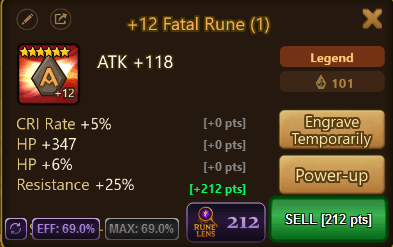
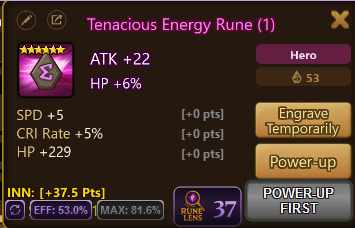
When a rune is detected, the overlay renders several visual elements directly on top of the game — all designed to be readable at a glance without interrupting your gameplay:
A large color-coded button over the sell region. Green means safe to SELL, red means KEEP. The button shows your total RL Score points so you know exactly how the rune scored.
Green "+X pts" labels next to each substat showing exactly how many points that substat contributed. Instantly see which substats are carrying the rune.
Gold text showing "INN: +X.X Pts" — the bonus points from the rune’s innate stat. Only appears on runes that have an innate stat.
"EFF: X%" shows current rune efficiency. "MAX: X%" shows projected max efficiency at +12 — displayed in gold if ≥75%, grey if below.
When a rune is below threshold but worth leveling further, the overlay shows "POWER-UP FIRST" and blocks the sell button to prevent accidental sells.
If a rune has an exceptionally high individual roll (e.g. 19+ SPD), the overlay shows "AUTO-KEEP" with the reason — even if the total score is below threshold.
Every overlay element can be individually toggled on or off from the AUTO tab checkboxes: Sell/Keep, Sub Pts, Overall Score, Efficiency, and Max Efficiency. Configure what you want to see.
Web App (Lite Version)
Don't have the desktop app? The web version provides the same scoring engine in your browser — no installation required. It includes two ways to evaluate runes:
Screen Capture Mode
Uses browser-based OCR (Tesseract.js) to read rune data from your screen. A persistent worker keeps OCR fast after the initial load. Includes hash-based change detection to skip redundant processing.
Manual Entry Mode
Type substat values directly into the entry panel. Perfect for theorycrafting, checking a specific rune, or when screen capture isn’t available. Instantly see RL Score, efficiency, and the keep/sell decision.
Same Scoring Engine
Identical RL Score formula, efficiency calculation, and keep/sell logic as the desktop app. Same thresholds, same auto-keep rules, same power-up suggestions — just without the in-game overlay.
The RL Score
The RL Score is SWLens's proprietary rune quality metric — the single number that powers every sell/keep decision, every builder optimization, and every analytics dashboard across the entire platform. It measures how many meaningful rolls a rune received into its substats, weighted by stat importance.
How It Works
Each substat type has a step value — a normalization factor based on that stat's roll range. The formula counts how many rolls beyond the initial minimum a substat has received. Higher-value stats like SPD and CRI Rate use smaller step values, making each additional roll worth more points.
Examples
Innate Bonus
Runes with a percentage innate stat receive up to 50 bonus points. The bonus is calculated as a proportion of the innate's maximum possible value. Flat innates (HP, ATK, DEF without %) do not score.
Efficiency
Alongside RL Score, each rune has an efficiency percentage measuring how close it is to theoretical perfection. A perfect 6-star Legend rune with max innate and all max rolls at +12 reaches 100%. The overlay shows both current efficiency and projected max efficiency at +12 so you can see a rune's potential before fully powering it up.
Keep/Sell Thresholds
The keep/sell decision combines RL Score, efficiency, and individual stat thresholds. All values are fully customizable in the desktop app settings and web app settings panel.
Recommended Thresholds by Account Stage
All thresholds are fully customizable in the desktop app Settings and the web app settings panel — adjust them as your account grows. Not sure where to start? Here are our recommended ranges based on your account progression:
Keep Logic
A rune is marked KEEP if any of these conditions are met:
- RL Score meets or exceeds your keep threshold
- Max Efficiency meets or exceeds your efficiency threshold
- Any individual substat triggers an auto-keep (e.g. 19+ SPD, 24+ CRI DMG)
Auto-Keep: Exceptional Rolls
Even if the total score is below threshold, a rune with an exceptionally high individual roll is automatically kept. These thresholds are fully customizable in Settings — adjust them to match your account's rune quality. Defaults:
Power-Up Suggestions
Runes below threshold may still be worth leveling. The overlay intelligently suggests “POWER-UP FIRST” when a rune has potential — blocking the sell button to prevent accidental sells. Hero runes are evaluated up to +9, Legend runes up to +12, with the suggestion only appearing when the rune is close enough to threshold that further rolls could push it over.
Crucially, Rune Lens also tells you when a rune is not worth powering up further. If the max projected score at +12 can't reach your threshold even with perfect remaining rolls, the overlay skips the power-up suggestion and goes straight to SELL — saving you mana stones on runes that will never make the cut.
Home Dashboard Quick Overview
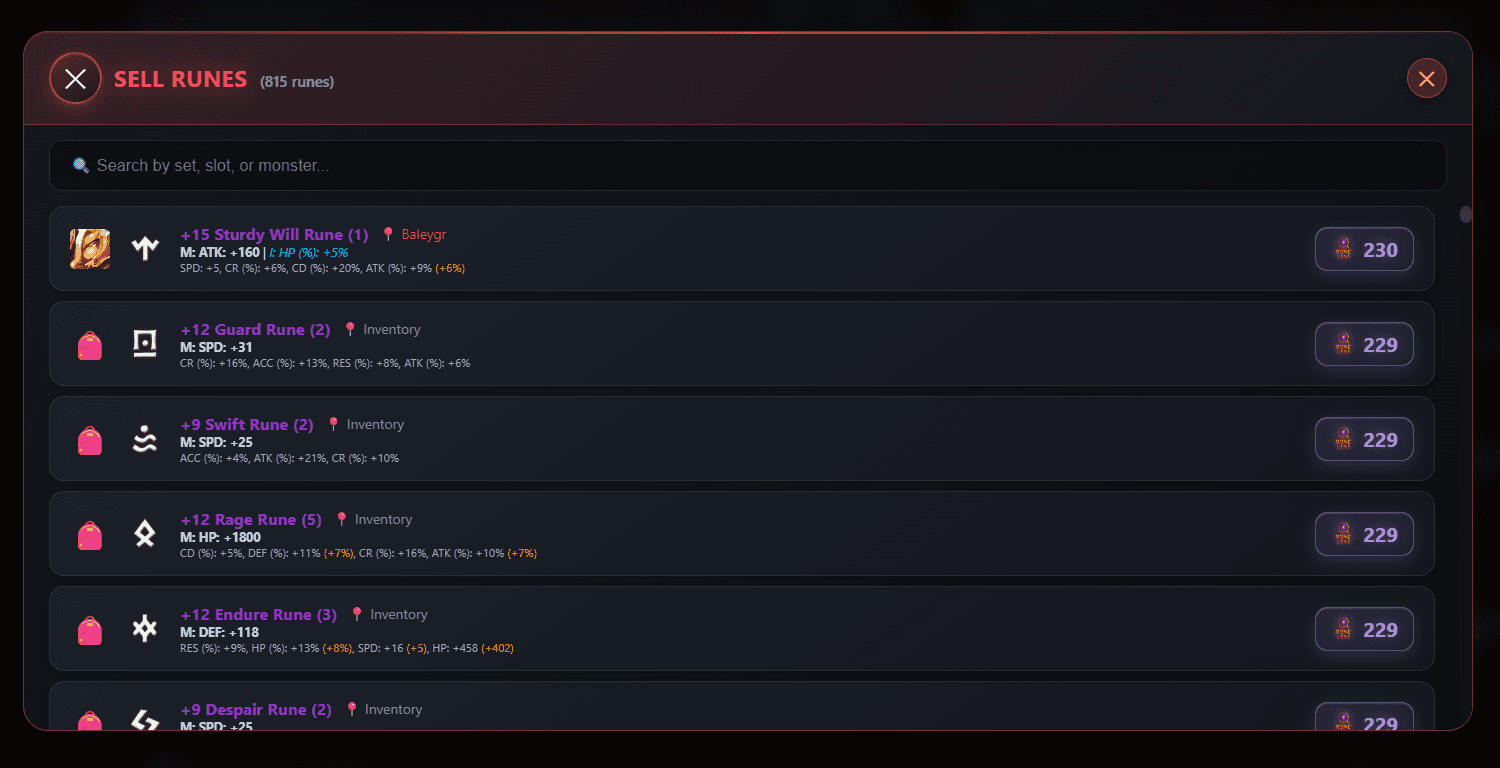
Your home dashboard provides a quick rune overview without opening the full Rune Lens tool. After importing your SWEX JSON, see at a glance how many runes are worth keeping, selling, or need further power-ups.
- Keep / Sell / Unpowered counts — instant summary of your rune inventory health
- Quick action buttons with popup details for reviewing individual rune decisions
- Threshold display showing your configured RL Score and efficiency thresholds
- Recommendation tooltips explaining why each rune received its decision
Rune Analytics & Dungeon Farming Priority
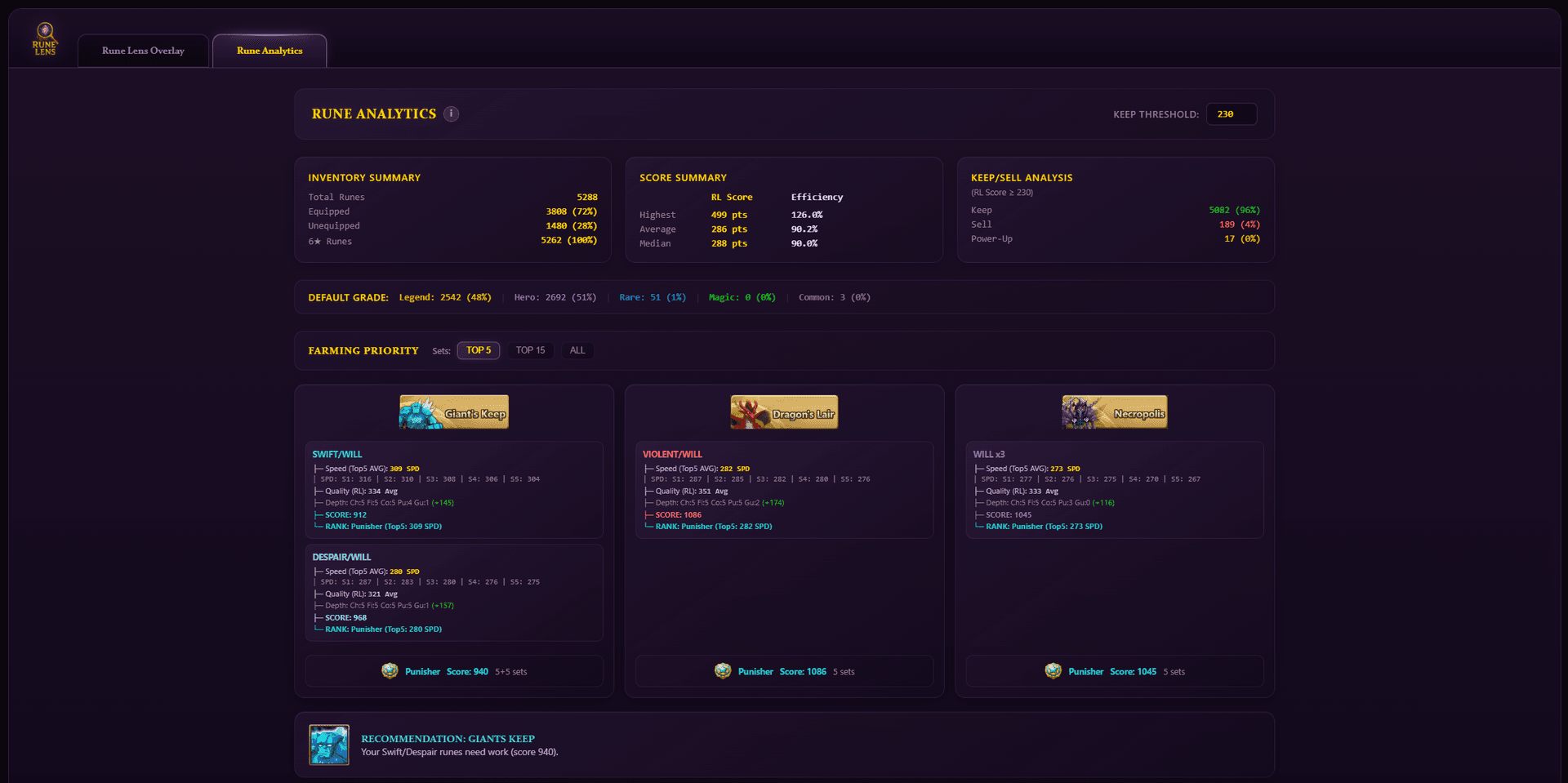
Beyond individual rune evaluation, Rune Lens provides deep analytics across your entire rune inventory. The farming priority system analyzes your rune pool by set type and tells you exactly which dungeon to farm next based on where your runes are weakest.
Dungeon Farming Priority
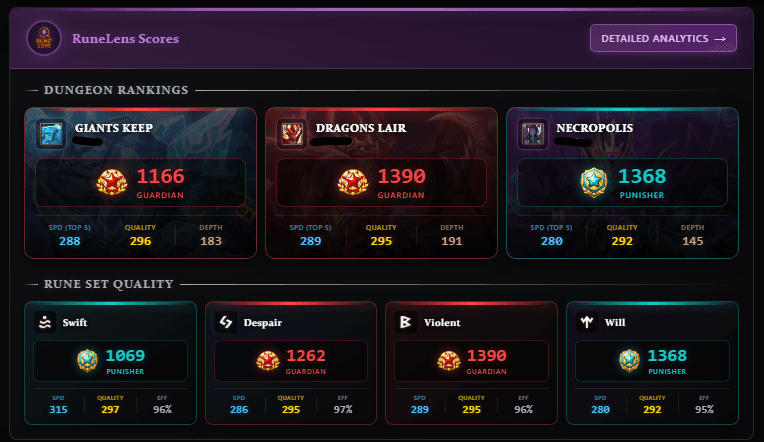
The system evaluates your key rune sets — Swift, Despair, Violent, and Will — across multiple dimensions including speed, rune quality, and pool depth. It then recommends farming the dungeon where your runes need the most work:



What the Score Considers
Speed
How fast your top sets are compared to competitive benchmarks for each set type.
Quality
Average RL Score of your best runes in each set — are the substats actually good?
Depth
How many usable sets you have at each speed tier — one great set isn’t enough if you need ten.
Per-Set Ranking System
Each rune set is assigned an RTA-style rank based on the average speed of your top sets, so you can see at a glance how competitive your rune pool is:





Speed thresholds vary by set type — Swift sets need higher speeds to reach Guardian than Violent or Will sets. Each set card on the dashboard shows its rank, average speed, and a breakdown of how many sets you have at each tier.
Per-Set Score Cards
The analytics dashboard shows detailed score cards for Swift, Despair, Violent, and Will. Each card displays the set's rank, farming score, top-5 average speed, RL Score quality metric, tier distribution, and the number of usable sets at each speed bracket.
RL Score Across the Platform
The RL Score isn't just for the overlay — it's the backbone of the entire SWLens platform. Every tool that touches rune quality uses the RL Score as its foundation:
Siege / Arena / WGB Builders
RL Score provides rune quality context during team building, complementing the optimization and allocation process.
Rune Optimizer
RL Score enhances the rune selection process, helping filter and prioritize candidates alongside other optimization criteria.
Re-App Calculator
Identifies re-appraisal candidates by analyzing the RL Score gap in your runes.
Home Dashboard
Keep/sell counts, farming scores, and dungeon priority cards all powered by RL Score.
Frequently Asked Questions
How do I set up the Rune Lens desktop overlay?
Download the SWLens desktop app, launch Summoners War on Steam, then click START. The overlay auto-detects your game window and maps the rune information regions automatically. Navigate to your rune inventory and the overlay appears instantly. Press STOP when you’re done.
What’s the difference between Management and Power-Up mode?
Management mode reads the rune info panel on the right side of your inventory screen. Power-Up mode reads the centered panel when you’re enhancing runes. The app auto-detects and switches between them as you navigate in-game.
What if auto-detect doesn’t find my game window?
Click MANUAL MAP in the control bar. Draw bounding boxes for each region — header, main stat, substats, grade, and sell button. These manual mappings are saved locally and persist across sessions, so you only need to do this once.
Can I customize the keep/sell threshold?
Yes. Open Settings and adjust the RL Score threshold (default 230 points), Efficiency threshold, and individual auto-keep thresholds per stat type. You can also toggle whether ACC and RES are included in scoring.
Is the overlay detectable by the game?
No. The overlay is a completely separate transparent window that does not inject into or modify the game process. It simply reads pixels from the screen and displays information on top — completely non-invasive.
Does it work with emulators?
Yes. Use Manual Mode to draw region boxes over the emulator window. The web app version also works in any browser. For Steam, auto-detect works out of the box.
What is the RL Score?
The RL Score is SWLens’s proprietary rune quality metric. It measures the number and quality of substat rolls using stat-specific weighting, innate bonuses, and efficiency analysis. It’s the backbone of the entire SWLens platform.
About the SWLens Rune Lens
The SWLens Rune Lens is the only real-time overlay tool for Summoners War, providing instant sell/keep recommendations powered by the proprietary RL Score formula. The desktop overlay auto-detects your game window, reads rune data via OCR in real-time, and displays scores, efficiency, and recommendations directly on top of the game. The web app provides browser-based screen capture and manual entry with the same scoring engine. The integrated dungeon farming priority system analyzes your rune inventory across Swift, Despair, Violent, and Will sets to recommend which dungeon needs farming most, with RTA-style rankings from Challenger to Guardian. Combined with auto-keep logic, power-up suggestions, customizable thresholds, and deep per-set analytics, Rune Lens is the most comprehensive Summoners War rune analyzer available for competitive players who want data-driven rune decisions.
Ready to Evaluate Your Runes?
Import your SWEX JSON or fire up the desktop overlay. See which runes to keep, sell, and power up — instantly. Completely free to use.
 Try for Free
 Download